OSPF Area Types
ccnp-routing
Compare standard, stub, totally stubby, NSSA, and totally NSSA areas and observe how each area type changes the LSAs in the OSPF database.
Standard Area
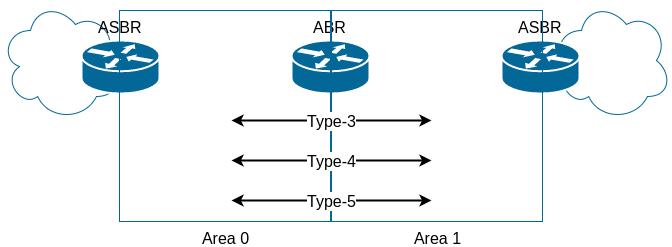
B1#show ip ospf database

            OSPF Router with ID (1.1.1.1) (Process ID 1)

        Router Link States (Area 1)

Link ID         ADV Router      Age         Seq#       Checksum Link count
1.1.1.1         1.1.1.1         168         0x8000000E 0x003369 1
2.2.2.2         2.2.2.2         18          0x8000000B 0x00F79F 1
3.3.3.3         3.3.3.3         502         0x80000006 0x00E1B3 1

        Net Link States (Area 1)

Link ID         ADV Router      Age         Seq#       Checksum
172.16.1.3      3.3.3.3         200         0x8000000C 0x00A5A0

        Summary Net Link States (Area 1)

Link ID         ADV Router      Age         Seq#       Checksum
10.10.0.0       2.2.2.2         214         0x80000007 0x0050C9
10.10.0.0       3.3.3.3         206         0x80000005 0x0036E1

        Summary ASB Link States (Area 1)

Link ID         ADV Router      Age         Seq#       Checksum
99.99.99.98     2.2.2.2         214         0x80000001 0x008124
99.99.99.98     3.3.3.3         206         0x80000001 0x00633E
99.99.99.99     2.2.2.2         214         0x80000001 0x00772D
99.99.99.99     3.3.3.3         206         0x80000001 0x005947

        Type-5 AS External Link States

Link ID         ADV Router      Age         Seq#       Checksum Tag
0.0.0.0         99.99.99.98     1145        0x80000002 0x00998B 1
0.0.0.0         99.99.99.99     1385        0x80000002 0x009390 1
1.1.1.1         1.1.1.1         161         0x80000002 0x0099FD 0
Remember 0.0.0.0s in Type-5 LSA are generated by default-information originate
WAN1#show ip route 1.1.1.1
Routing entry for 1.1.1.1/32
  Known via "ospf 1", distance 110, metric 20, type extern 2, forward metric 1
  Last update from 172.16.1.1 on GigabitEthernet0/0, 00:04:37 ago
  Routing Descriptor Blocks:
  * 172.16.1.1, from 1.1.1.1, 00:04:37 ago, via GigabitEthernet0/0
      Route metric is 20, traffic share count is 1
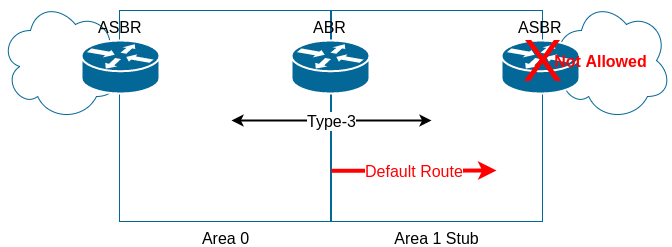
Stub Area
B1(config-router)#area 1 stub
*Dec 12 02:03:13.067: %OSPF-4-ASBR_WITHOUT_VALID_AREA: Router is currently an ASBR while having only one area which is a stub area
*Dec 12 02:03:13.100: %OSPF-5-ADJCHG: Process 1, Nbr 2.2.2.2 on GigabitEthernet0/0 from FULL to DOWN, Neighbor Down: Adjacency forced to reset
*Dec 12 02:03:13.101: OSPF-1 LSGEN: Scheduling rtr LSA for area 1, build flag 0x41 (from 0x2D7BB7E)
*Dec 12 02:03:13.103: OSPF-1 LSGEN: Scheduling rtr LSA for area 1, build flag 0x41 (from 0x2D51EF5)
*Dec 12 02:03:13.104: %OSPF-5-ADJCHG: Process 1, Nbr 3.3.3.3 on GigabitEthernet0/0 from FULL to DOWN, Neighbor Down: Adjacency forced to reset
*Dec 12 02:03:13.105: OSPF-1 LSGEN: Scheduling rtr LSA for area 1, build flag 0x41 (from 0x2D7BB7E)
*Dec 12 02:03:13.106: OSPF-1 LSGEN: Scheduling network LSA on GigabitEthernet0/0, build flag 0x40 (from 0x2DD43BC)
*Dec 12 02:03:13.106: OSPF-1 LSGEN: Scheduling rtr LSA for area 1, build flag 0x41 (from 0x2D51EF5)
*Dec 12 02:03:14.050: OSPF-1 LSGEN: Reset old DR on intf GigabitEthernet0/0
*Dec 12 02:03:14.056: OSPF-1 LSGEN: Build router LSA for area 1, router ID 1.1.1.1, seq 0x80000016
*Dec 12 02:03:14.057: OSPF-1 LSGEN: No full nbrs on intf GigabitEthernet0/0 to build Net LSA
We have to configure all routers in an area as stub to become OSPF neighbors
WAN2(config-router)#area 1 stub
*Dec 12 01:56:56.734: %OSPF-5-ADJCHG: Process 1, Nbr 2.2.2.2 on GigabitEthernet0/0 from FULL to DOWN, Neighbor Down: Adjacency forced to reset
*Dec 12 01:57:01.554: %OSPF-5-ADJCHG: Process 1, Nbr 1.1.1.1 on GigabitEthernet0/0 from LOADING to FULL, Loading Done
See the result of
debug ip ospf lsa-generation on B1
B1(config-router)#
*Dec 12 02:04:15.543: OSPF-1 LSGEN: Scheduling rtr LSA for area 1, build flag 0x41 (from 0x2D51EF5)
*Dec 12 02:04:15.544: OSPF-1 LSGEN: Scheduling rtr LSA for area 1, build flag 0x41 (from 0x2D51EF5)
*Dec 12 02:04:15.632: %OSPF-5-ADJCHG: Process 1, Nbr 3.3.3.3 on GigabitEthernet0/0 from LOADING to FULL, Loading Done
*Dec 12 02:04:15.633: OSPF-1 LSGEN: Scheduling rtr LSA for area 1, build flag 0x51 (from 0x2D7BB7E)
*Dec 12 02:04:16.099: OSPF-1 LSGEN: Reset old DR on intf GigabitEthernet0/0
*Dec 12 02:04:16.101: OSPF-1 LSGEN: Build router LSA for area 1, router ID 1.1.1.1, seq 0x80000017
*Dec 12 02:04:28.791: OSPF-1 LSGEN: Scheduling rtr LSA for area 1, build flag 0x41 (from 0x2D51EF5)
*Dec 12 02:04:29.294: OSPF-1 LSGEN: No change in router LSA, area 1
*Dec 12 02:04:58.630: %OSPF-5-ADJCHG: Process 1, Nbr 2.2.2.2 on GigabitEthernet0/0 from DOWN to DOWN, Neighbor Down: Dead timer expired
*Dec 12 02:04:58.634: OSPF-1 LSGEN: Scheduling rtr LSA for area 1, build flag 0x41 (from 0x2D51EF5)
*Dec 12 02:04:59.136: OSPF-1 LSGEN: No change in router LSA, area 1
And one more router within area 1 needed to be configured stub
WAN1(config)#router ospf 1
WAN1(config-router)#area 1 stub
Now, let us see the result of
show ip ospf database on B1
B1#show ip ospf database

            OSPF Router with ID (1.1.1.1) (Process ID 1)

        Router Link States (Area 1)

Link ID         ADV Router      Age         Seq#       Checksum Link count
1.1.1.1         1.1.1.1         245         0x80000017 0x00395E 1
2.2.2.2         2.2.2.2         105         0x80000012 0x00088A 1
3.3.3.3         3.3.3.3         246         0x8000000C 0x00D5B9 1

        Net Link States (Area 1)

Link ID         ADV Router      Age         Seq#       Checksum
172.16.1.3      3.3.3.3         104         0x80000015 0x00B18D

        Summary Net Link States (Area 1)

Link ID         ADV Router      Age         Seq#       Checksum
0.0.0.0         2.2.2.2         107         0x80000001 0x0075C0
0.0.0.0         3.3.3.3         250         0x80000001 0x0057DA
10.10.0.0       2.2.2.2         107         0x8000000A 0x0068B0
10.10.0.0       3.3.3.3         250         0x80000008 0x004EC8
Voila, there are no type 3 and 5 LSAs
Totally Stub Area
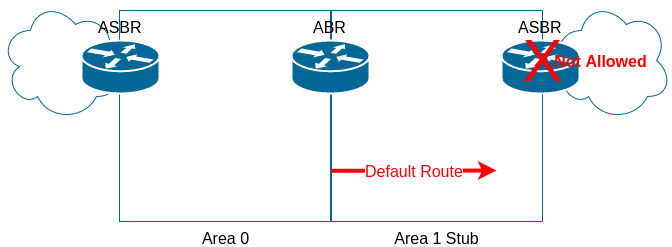
- To configure, we issue command
area X stubon all routers inside area X except ABRs. - On ABRs we issue command
area X stub no-summary
WAN2(config-router)#area 1 stub no-summary
B1#show ip ospf database

            OSPF Router with ID (1.1.1.1) (Process ID 1)

        Router Link States (Area 1)

Link ID         ADV Router      Age         Seq#       Checksum Link count
1.1.1.1         1.1.1.1         580         0x80000017 0x00395E 1
2.2.2.2         2.2.2.2         440         0x80000012 0x00088A 1
3.3.3.3         3.3.3.3         581         0x8000000C 0x00D5B9 1

        Net Link States (Area 1)

Link ID         ADV Router      Age         Seq#       Checksum
172.16.1.3      3.3.3.3         440         0x80000015 0x00B18D

        Summary Net Link States (Area 1)

Link ID         ADV Router      Age         Seq#       Checksum
0.0.0.0         2.2.2.2         443         0x80000001 0x0075C0
0.0.0.0         3.3.3.3         11          0x80000003 0x0053DC
10.10.0.0       2.2.2.2         443         0x8000000A 0x0068B0
WAN1(config-router)#area 1 stub no-summary
B1#show ip ospf database

            OSPF Router with ID (1.1.1.1) (Process ID 1)

        Router Link States (Area 1)

Link ID         ADV Router      Age         Seq#       Checksum Link count
1.1.1.1         1.1.1.1         650         0x80000017 0x00395E 1
2.2.2.2         2.2.2.2         510         0x80000012 0x00088A 1
3.3.3.3         3.3.3.3         651         0x8000000C 0x00D5B9 1

        Net Link States (Area 1)

Link ID         ADV Router      Age         Seq#       Checksum
172.16.1.3      3.3.3.3         509         0x80000015 0x00B18D

        Summary Net Link States (Area 1)

Link ID         ADV Router      Age         Seq#       Checksum
0.0.0.0         3.3.3.3         81          0x80000003 0x0053DC
Not-So-Stubby Area (NSSA)
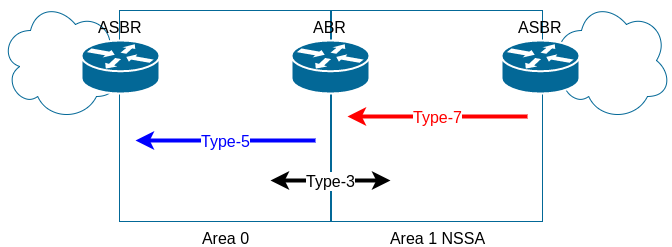
- Issue
area X nssaon all routers in area X
WAN1#show running-config | section ospf
router ospf 1
 auto-cost reference-bandwidth 1000
 area 0 range 10.10.0.0 255.255.0.0
 area 1 nssa
 network 10.10.0.0 0.0.255.255 area 0
 network 172.16.1.0 0.0.0.255 area 1
We have to configure area 1 nssa on B1 and WAN2 as well. Let us see the result on B1:
B1#show ip ospf database

            OSPF Router with ID (1.1.1.1) (Process ID 1)

        Router Link States (Area 1)

Link ID         ADV Router      Age         Seq#       Checksum Link count
1.1.1.1         1.1.1.1         521         0x8000001D 0x00BACC 1
2.2.2.2         2.2.2.2         603         0x80000017 0x008BF7 1
3.3.3.3         3.3.3.3         786         0x8000000F 0x005D25 1

        Net Link States (Area 1)

Link ID         ADV Router      Age         Seq#       Checksum
172.16.1.3      3.3.3.3         790         0x80000018 0x003301

        Summary Net Link States (Area 1)

Link ID         ADV Router      Age         Seq#       Checksum
10.10.0.0       2.2.2.2         814         0x80000003 0x00FD1A
10.10.0.0       3.3.3.3         792         0x80000003 0x00DF34

        Type-7 AS External Link States (Area 1)

Link ID         ADV Router      Age         Seq#       Checksum Tag
1.1.1.1         1.1.1.1         521         0x80000001 0x004E81 0
As we can see, there is no default route injected into NSSA although Type-3 LSAs can pass. We have to explicitly configure it on ABRs.
WAN1(config)#router ospf 1
WAN1(config-router)#area 1 nssa default-information-originate
WAN2(config)#router ospf 1
WAN2(config-router)#area 1 nssa default-information-originate
B1#show ip ospf database

            OSPF Router with ID (1.1.1.1) (Process ID 1)

        Router Link States (Area 1)

Link ID         ADV Router      Age         Seq#       Checksum Link count
1.1.1.1         1.1.1.1         703         0x8000001D 0x00BACC 1
2.2.2.2         2.2.2.2         784         0x80000017 0x008BF7 1
3.3.3.3         3.3.3.3         967         0x8000000F 0x005D25 1

        Net Link States (Area 1)

Link ID         ADV Router      Age         Seq#       Checksum
172.16.1.3      3.3.3.3         971         0x80000018 0x003301

        Summary Net Link States (Area 1)

Link ID         ADV Router      Age         Seq#       Checksum
10.10.0.0       2.2.2.2         995         0x80000003 0x00FD1A
10.10.0.0       3.3.3.3         973         0x80000003 0x00DF34

        Type-7 AS External Link States (Area 1)

Link ID         ADV Router      Age         Seq#       Checksum Tag
0.0.0.0         2.2.2.2         5           0x80000001 0x00D0D8 0
0.0.0.0         3.3.3.3         21          0x80000001 0x00B2F2 0
1.1.1.1         1.1.1.1         702         0x80000001 0x004E81 0
Redistribution in NSSA
- We cannot redistribute routes into Stub and Totally Stub areas
- But we can redistribute into NSSA
Totally NSSA
- Like NSSA but 2 differences:
- Type-3 LSA cannot pass
- Default route is automatically injected. There is no need to
area 1 nssa default-information-originate
- To configure, on ABRs we add
no-summarykeyword at the end ofarea 1 nssaOSPF router subcommand
WAN1#show run | s ospf
router ospf 1
 auto-cost reference-bandwidth 1000
 area 0 range 10.10.0.0 255.255.0.0
 area 1 nssa no-summary
 network 10.10.0.0 0.0.255.255 area 0
 network 172.16.1.0 0.0.0.255 area 1
WAN2#show run | s ospf
router ospf 1
 auto-cost reference-bandwidth 1000
 area 0 range 10.10.0.0 255.255.0.0
 area 1 nssa no-summary
 network 10.10.0.0 0.0.255.255 area 0
 network 172.16.1.0 0.0.0.255 area 1
B1#show run | s ospf
router ospf 1
 auto-cost reference-bandwidth 1000
 area 1 nssa
 redistribute connected subnets
 network 172.16.1.0 0.0.0.255 area 1
B1#show ip ospf database

            OSPF Router with ID (1.1.1.1) (Process ID 1)

        Router Link States (Area 1)

Link ID         ADV Router      Age         Seq#       Checksum Link count
1.1.1.1         1.1.1.1         1159        0x8000001D 0x00BACC 1
2.2.2.2         2.2.2.2         1240        0x80000017 0x008BF7 1
3.3.3.3         3.3.3.3         1423        0x8000000F 0x005D25 1

        Net Link States (Area 1)

Link ID         ADV Router      Age         Seq#       Checksum
172.16.1.3      3.3.3.3         1427        0x80000018 0x003301

        Summary Net Link States (Area 1)

Link ID         ADV Router      Age         Seq#       Checksum
0.0.0.0         2.2.2.2         163         0x80000001 0x00FC31
0.0.0.0         3.3.3.3         155         0x80000001 0x00DE4B

        Type-7 AS External Link States (Area 1)

Link ID         ADV Router      Age         Seq#       Checksum Tag
1.1.1.1         1.1.1.1         1158        0x80000001 0x004E81 0