Configuring a Label Switched Network
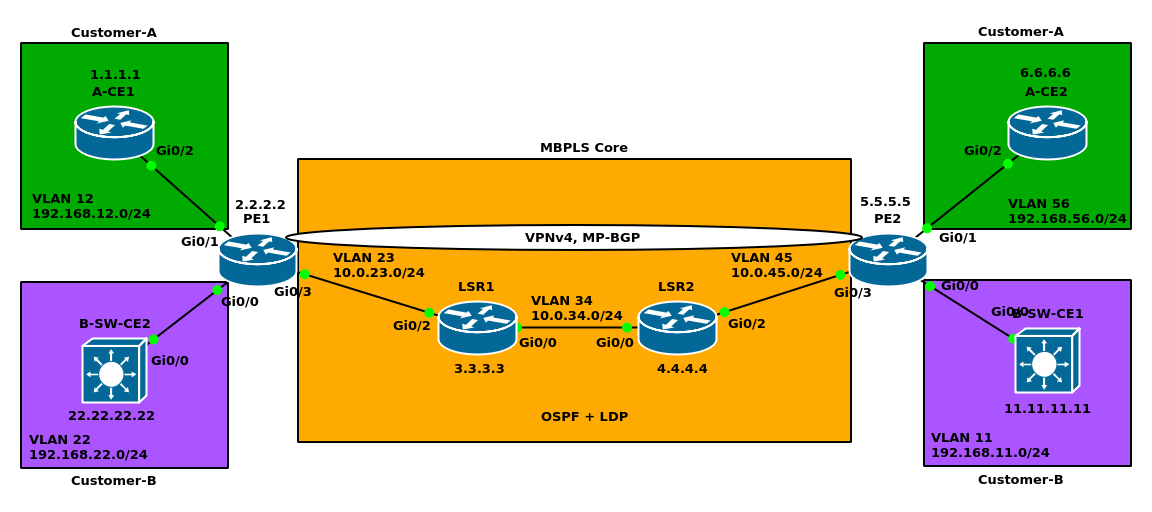
Base configuration
Customer-A A-CE1
hostname A-CE1
!
ip cef
!
interface Loopback0
 ip address 1.1.1.1 255.255.255.255
!
interface GigabitEthernet0/2.12
 encapsulation dot1Q 12
 ip address 192.168.12.1 255.255.255.0
Customer-B B-SW-CE2
hostname B-SW-CE2
!
ip cef
!
interface Loopback0
 ip address 22.22.22.22 255.255.255.255
!
interface GigabitEthernet0/0.22
 encapsulation dot1Q 22
 ip address 192.168.22.22 255.255.255.0
PE1:
hostname PE1
!
ip cef
!
interface Loopback0
 ip address 2.2.2.2 255.255.255.255
!
interface GigabitEthernet0/0.22
!
interface GigabitEthernet0/1.12
!
interface GigabitEthernet0/3.23
 encapsulation dot1Q 23
 ip address 10.0.23.2 255.255.255.0
 ip ospf network point-to-point
!
router ospf 1
 router-id 2.2.2.2
 passive-interface default
 no passive-interface GigabitEthernet0/3.23
 network 2.2.2.2 0.0.0.0 area 0
 network 10.0.23.2 0.0.0.0 area 0
LSR1:
hostname LSR1
!
ip cef
!
interface Loopback0
 ip address 3.3.3.3 255.255.255.255
!
interface GigabitEthernet0/0.34
 encapsulation dot1Q 34
 ip address 10.0.34.3 255.255.255.0
 ip ospf network point-to-point
!
interface GigabitEthernet0/2.23
 encapsulation dot1Q 23
 ip address 10.0.23.3 255.255.255.0
 ip ospf network point-to-point
!
router ospf 1
 router-id 3.3.3.3
 passive-interface default
 no passive-interface GigabitEthernet0/0.34
 no passive-interface GigabitEthernet0/2.23
 network 3.3.3.3 0.0.0.0 area 0
 network 10.0.23.3 0.0.0.0 area 0
 network 10.0.34.3 0.0.0.0 area 0
LSR2:
hostname LSR2
!
ip cef
!
interface Loopback0
 ip address 4.4.4.4 255.255.255.255
!
interface GigabitEthernet0/0.34
 encapsulation dot1Q 34
 ip address 10.0.34.4 255.255.255.0
 ip ospf network point-to-point
!
interface GigabitEthernet0/2.45
 encapsulation dot1Q 45
 ip address 10.0.45.4 255.255.255.0
 ip ospf network point-to-point
!
router ospf 1
 router-id 4.4.4.4
 passive-interface default
 no passive-interface GigabitEthernet0/0.34
 no passive-interface GigabitEthernet0/2.45
 network 4.4.4.4 0.0.0.0 area 0
 network 10.0.34.4 0.0.0.0 area 0
 network 10.0.45.4 0.0.0.0 area 0
PE2:
hostname PE2
!
ip cef
!
interface Loopback0
 ip address 5.5.5.5 255.255.255.255
!
interface GigabitEthernet0/0.11
!
interface GigabitEthernet0/1.56
!
interface GigabitEthernet0/3.45
 encapsulation dot1Q 45
 ip address 10.0.45.5 255.255.255.0
 ip ospf network point-to-point
!
router ospf 1
 router-id 5.5.5.5
 passive-interface default
 no passive-interface GigabitEthernet0/3.45
 network 5.5.5.5 0.0.0.0 area 0
 network 10.0.45.5 0.0.0.0 area 0
Customer-A A-CE2
hostname A-CE2
!
interface Loopback0
 ip address 6.6.6.6 255.255.255.255
!
interface GigabitEthernet0/2.56
 encapsulation dot1Q 56
 ip address 192.168.56.6 255.255.255.0
Customer-B B-SW-CE1
hostname B-SW-CE1
!
interface Loopback0
 ip address 11.11.11.11 255.255.255.255
!
interface GigabitEthernet0/0.11
 encapsulation dot1Q 11
 ip address 192.168.11.11 255.255.255.0
MPLS Configuration
PE1(config)#mpls ip
PE1(config)#mpls label protocol ?
  ldp  Use LDP (default)
  tdp  Use TDP
PE1(config)#mpls ldp router-id lo0
PE1(config)#mpls label range 200 299 # We issued this command only in lab environment to better troubleshoot
PE1(config)#interface gigabitEthernet 0/3.23
PE1(config-subif)#mpls ip
PE1#show mpls ldp bindings # Let's look at LIB table.
  lib entry: 2.2.2.2/32, rev 2
    local binding:  label: imp-null # Because 2.2.2.2/32 is directly connected
  lib entry: 3.3.3.3/32, rev 4
    local binding:  label: 200
  lib entry: 4.4.4.4/32, rev 6
    local binding:  label: 201
  lib entry: 5.5.5.5/32, rev 8
    local binding:  label: 202
  lib entry: 10.0.23.0/24, rev 10
    local binding:  label: imp-null # Because 10.0.23.0/24 is directly connected
  lib entry: 10.0.34.0/24, rev 12
    local binding:  label: 203
  lib entry: 10.0.45.0/24, rev 14
    local binding:  label: 204
LSR1:
mpls ip
mpls ldp router-id Loopback0
mpls label range 300 399
interface gigabitEthernet 0/2.23
 mpls ip
interface gigabitEthernet 0/0.34
 mpls ip
LSR2:
mpls ip
mpls ldp router-id Loopback0
mpls label range 400 499
interface gigabitEthernet 0/2.45
 mpls ip
interface gigabitEthernet 0/0.34
 mpls ip
LSR3:
mpls ip
mpls ldp router-id Loopback0
mpls label range 500 599
interface gigabitEthernet 0/3.45
 mpls ip
Verification
Show LDP neighbors for example in LSR2LSR2#show mpls ldp neighbor
Peer LDP Ident: 3.3.3.3:0; Local LDP Ident 4.4.4.4:0
TCP connection: 3.3.3.3.646 - 4.4.4.4.43713
State: Oper; Msgs sent/rcvd: 10/10; Downstream
Up time: 00:00:25
LDP discovery sources:
GigabitEthernet0/0.34, Src IP addr: 10.0.34.3
Addresses bound to peer LDP Ident:
10.0.34.3 10.0.23.3 3.3.3.3
Peer LDP Ident: 5.5.5.5:0; Local LDP Ident 4.4.4.4:0
TCP connection: 5.5.5.5.24166 - 4.4.4.4.646
State: Oper; Msgs sent/rcvd: 10/10; Downstream
Up time: 00:00:07
LDP discovery sources:
GigabitEthernet0/2.45, Src IP addr: 10.0.45.5
Addresses bound to peer LDP Ident:
10.0.45.5 5.5.5.5
Let us dig in through LDP Label Information Base (LIB)
PE2:PE2#show mpls ldp bindings
lib entry: 2.2.2.2/32, rev 2
local binding: label: 500
remote binding: lsr: 4.4.4.4:0, label: 403
lib entry: 3.3.3.3/32, rev 4
local binding: label: 501
remote binding: lsr: 4.4.4.4:0, label: 401
lib entry: 4.4.4.4/32, rev 6
local binding: label: 502
remote binding: lsr: 4.4.4.4:0, label: imp-null
lib entry: 5.5.5.5/32, rev 8
local binding: label: imp-null
remote binding: lsr: 4.4.4.4:0, label: 400
lib entry: 10.0.23.0/24, rev 10
local binding: label: 503
remote binding: lsr: 4.4.4.4:0, label: 402
lib entry: 10.0.34.0/24, rev 12
local binding: label: 504
remote binding: lsr: 4.4.4.4:0, label: imp-null
lib entry: 10.0.45.0/24, rev 14
local binding: label: imp-null
remote binding: lsr: 4.4.4.4:0, label: imp-null
Let us talk about the bolded lines in the output above.
Per each prefix we have an LIB entry.
imp-nullis used for PHP (Penultimate Hop Popping). Numerically it has the label value = 3.- It says router PE2! We have 5.5.5.5 directly connected
- When we advertise this 5.5.5.5/32 interface, we advertise it with the label = 3.
At the same time we can see router LSR2 generated its own local label (402).
Let us talk about the last bolded line (
remote binding: lsr: 4.4.4.4:0, label: imp-null):- It says if you want to go to 10.0.34.0/24, pop off the label and then send it over to LSR2. Because the remote LSR is directly connected to that prefix.
Let us discuss a LIB entry for prefix 5.5.5.5/32 in LSR1 and LSR2
LSR2#show mpls ldp bindings 5.5.5.5 32
lib entry: 5.5.5.5/32, rev 8
  local binding:  label: 400
  remote binding: lsr: 5.5.5.5:0, label: imp-null
  remote binding: lsr: 3.3.3.3:0, label: 300
We have got two remote bindings. Let us see the output of the same command in LSR1:
LSR1#show mpls ldp bindings 5.5.5.5 32
lib entry: 5.5.5.5/32, rev 8
  local binding:  label: 300
  remote binding: lsr: 2.2.2.2:0, label: 200
  remote binding: lsr: 4.4.4.4:0, label: 400
Now let us see some LFIB tables (data plane)
LSR2#show mpls forwarding-table
Local      Outgoing   Prefix           Bytes Label   Outgoing   Next Hop
Label      Label      or Tunnel Id     Switched      interface
400        Pop Label  5.5.5.5/32       0             Gi0/2.45   10.0.45.5
401        Pop Label  3.3.3.3/32       0             Gi0/0.34   10.0.34.3
402        Pop Label  10.0.23.0/24     0             Gi0/0.34   10.0.34.3
403        303        2.2.2.2/32       0             Gi0/0.34   10.0.34.3
Let us just look at the entry for prefix/length 5.5.5.5/32
If we get an MPLS packet, and that MPLS packet happens to be labeled with label 402, Then LSR2 pops the tag and sends it out Gi0/2.45. Let us see the result of the same prefix on LSR1 to see the swap operation
LSR1#show mpls forwarding-table 5.5.5.5
Local      Outgoing   Prefix           Bytes Label   Outgoing   Next Hop
Label      Label      or Tunnel Id     Switched      interface
300        400        5.5.5.5/32       0             Gi0/0.34   10.0.34.4
Here the label 300 is swapped with label 400 which LSR1 learned from LSR2
ping to 5.5.5.5 from PE1. I am enabling debug mpls packet on an intermediary LSR. For example, LSR1.
LSR1#debug mpls packet
PE1#show ip cef 5.5.5.5
5.5.5.5/32
  nexthop 10.0.23.3 GigabitEthernet0/3.23 label 300()
PE1#ping 5.5.5.5 repeat 1 source lo0
LSR1#
*Jan 24 01:15:42.235: MPLS les: Gi0/2.23: rx: Len 122 Stack {300 0 255} - ipv4 data s:2.2.2.2 d:5.5.5.5 ttl:255 tos:0 prot:1
*Jan 24 01:15:42.235: MPLS les: Gi0/0.34: tx: Len 122 Stack {400 0 254} - ipv4 data s:2.2.2.2 d:5.5.5.5 ttl:255 tos:0 prot:1
*Jan 24 01:15:42.250: MPLS les: Gi0/0.34: rx: Len 122 Stack {303 0 254} - ipv4 data s:5.5.5.5 d:2.2.2.2 ttl:255 tos:0 prot:1
See the first 2 lines? From show mpls forwarding-table 5.5.5.5 shown above, we expected that label 300 should be swapped with label 400. Now in the first two lines we see this exactly happened.