EIGRP Route Summarization
ccnp-routing
Notes on EIGRP auto and manual summarization, configuring a per-interface summary address, and verifying the summary route and its Null0 entry.
- auto-summary:
- Advertises the summary routes to all of its neighbors.
- It is disabled by default as of IOS 15.0(1)M.
- In older IOSs it was enabled by default, so you needed to issue
no auto-summarywhere you decided to disable it. - Where to check if this is disabled or enabled?
show ip protocols | begin eigrp
- Manual summary
- Manual summarization is configured per interface.
- I am going to work on it in this topic
- It can be done in conjunction with auto summarization or independently
- EIGRP will not send a classful summary route to a neighbor who is advertising a subnet of that major network (Split Horizon)
Configuration
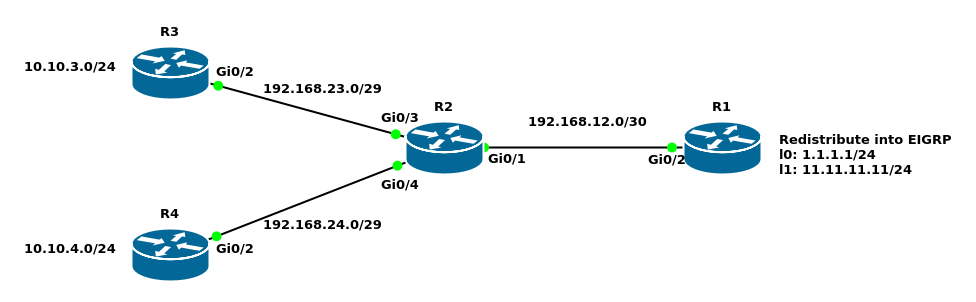
I took the topology from the 05_02 file:
R1#show ip route eigrp
Gateway of last resort is not set

      10.0.0.0/24 is subnetted, 2 subnets
D        10.10.3.0 [90/16000] via 192.168.12.2, 00:30:16, GigabitEthernet0/2
D        10.10.4.0 [90/16000] via 192.168.12.2, 00:30:16, GigabitEthernet0/2
      192.168.23.0/29 is subnetted, 1 subnets
D        192.168.23.0
           [90/15360] via 192.168.12.2, 00:30:16, GigabitEthernet0/2
      192.168.24.0/29 is subnetted, 1 subnets
D        192.168.24.0
           [90/15360] via 192.168.12.2, 00:30:16, GigabitEthernet0/2
I am going to summarize 10.10.3.0 and 10.10.4.0 as a 10.10.0.0 255.255.255.248 route on R2 and advertise it to R1
R2(config-router-af-interface)#summary-address 10.10.0.0 255.255.248.0
*Dec 14 03:05:52.255: %DUAL-5-NBRCHANGE: EIGRP-IPv4 1: Neighbor 192.168.12.1 (GigabitEthernet0/1) is resync: summary configured
Now, let us see the result on R1
R1#sho ip route eigrp
Gateway of last resort is not set

      10.0.0.0/21 is subnetted, 1 subnets
D        10.10.0.0 [90/16000] via 192.168.12.2, 00:00:08, GigabitEthernet0/2
      192.168.23.0/29 is subnetted, 1 subnets
D        192.168.23.0
           [90/15360] via 192.168.12.2, 00:31:57, GigabitEthernet0/2
      192.168.24.0/29 is subnetted, 1 subnets
D        192.168.24.0
           [90/15360] via 192.168.12.2, 00:31:57, GigabitEthernet0/2
Verification
R2#show ip protocols | begin eigrp
Routing Protocol is "eigrp 1"
  Outgoing update filter list for all interfaces is not set
  Incoming update filter list for all interfaces is not set
  Default networks flagged in outgoing updates
  Default networks accepted from incoming updates
  EIGRP-IPv4 VR(R2) Address-Family Protocol for AS(1)
    Metric weight K1=1, K2=0, K3=1, K4=0, K5=0 K6=0
    Metric rib-scale 128
    Metric version 64bit
    Soft SIA disabled
    NSF-aware route hold timer is 240
    Router-ID: 192.168.24.2
    Topology : 0 (base)
      Active Timer: 3 min
      Distance: internal 90 external 170
      Maximum path: 4
      Maximum hopcount 100
      Maximum metric variance 1
      Total Prefix Count: 6
      Total Redist Count: 0

  Automatic Summarization: disabled
  Address Summarization:
    10.10.0.0/21 for Gi0/1
      Summarizing 2 components with metric 1392640
  Maximum path: 4
  Routing for Networks:
    192.168.12.2/32
    192.168.23.2/32
    192.168.24.2/32
  Routing Information Sources:
    Gateway         Distance      Last Update
    192.168.12.1          90      00:05:29
    192.168.24.4          90      00:37:14
    192.168.23.3          90      00:37:14
  Distance: internal 90 external 170
R2#show ip route eigrp
Gateway of last resort is not set

      10.0.0.0/8 is variably subnetted, 3 subnets, 2 masks
D        10.10.0.0/21 is a summary, 00:15:37, Null0
D        10.10.3.0/24
           [90/10880] via 192.168.23.3, 01:19:12, GigabitEthernet0/3
D        10.10.4.0/24
           [90/10880] via 192.168.24.4, 01:18:33, GigabitEthernet0/4
Null 0 interface has the same concept discussed in OSPF. Do not worry about the packets destined to 10.10.3.0 and 10.10.4.0 because they have more specific routes in the routing table.
One more command I would like to show:R1#show ip eigrp traffic EIGRP-IPv4 VR(R1) Address-Family Traffic Statistics for AS(1) Hellos sent/received: 1003/958 Updates sent/received: 16/24 Queries sent/received: 3/0 Replies sent/received: 0/3 Acks sent/received: 22/13 SIA-Queries sent/received: 0/0 SIA-Replies sent/received: 0/0 Hello Process ID: 121 PDM Process ID: 100 Socket Queue: 0/10000/1/0 (current/max/highest/drops) Input Queue: 0/10000/1/0 (current/max/highest/drops)
In a stable EIGRP topology the bolded numbers should remain relatively stagnant. If you see these numbers changing a lot, it means something is probably wrong.