DMVPN Phase 2
ccnp-routing
Converts branches to multipoint GRE for DMVPN Phase 2 and shows how RIP, EIGRP, OSPF, and BGP handle next hops for spoke to spoke traffic.
- Now branches will use multipoint GRE interface instead of point-to-point GRE interfaces
- Hence we do not configure manual destination on HQ
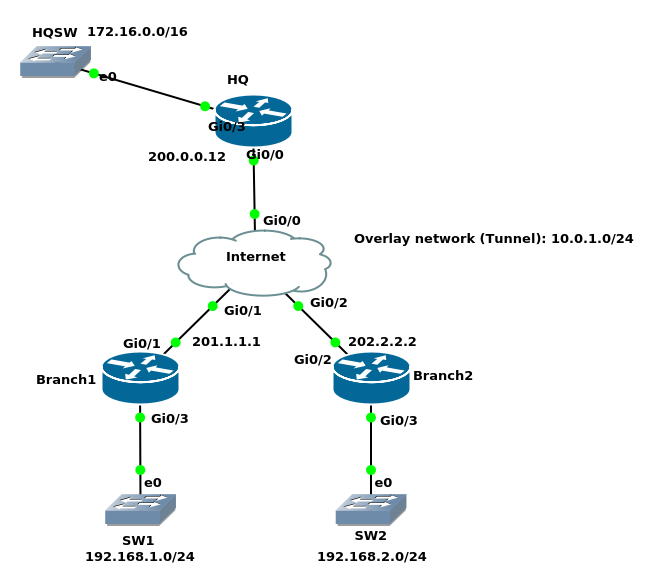
The following was phase 1 configuration
HQ: DMVPN phase 1 tunnel 0 configurationinterface Tunnel0 ip address 10.0.1.12 255.255.255.0 ip nhrp map multicast dynamic ip nhrp network-id 1 tunnel source GigabitEthernet0/0 tunnel mode gre multipointBranch1: DMVPN phase 1 tunnel 0 configuration
interface Tunnel0
 ip address 10.0.1.1 255.255.255.0
 ip nhrp map multicast 200.0.0.12
 ip nhrp map 10.0.1.12 200.0.0.12
 ip nhrp network-id 1
 ip nhrp nhs 10.0.1.12
 tunnel source GigabitEthernet0/1
 tunnel destination 200.0.0.12
Branch2: DMVPN phase 1 tunnel 0 configuration
interface Tunnel0
 ip address 10.0.1.2 255.255.255.0
 ip nhrp map multicast 200.0.0.12
 ip nhrp map 10.0.1.12 200.0.0.12
 ip nhrp network-id 1
 ip nhrp nhs 10.0.1.12
 tunnel source GigabitEthernet0/2
 tunnel destination 200.0.0.12
DMVPN Phase 2 Configuration
HQ’s configuration remains the same. No changes on the HQ compared to phase 1HQ(config)#no ip route 0.0.0.0 0.0.0.0 Null0 # Was here from BGP configurationBranch1:
Branch1(config-if)#no tunnel destination 200.0.0.12
Branch1(config-if)#tunnel mode gre multipoint
Branch2(config-if)#no tunnel destination 200.0.0.12
Branch2(config-if)#tunnel mode gre multipoint
HQ#show dmvpn
Legend: Attrb --> S - Static, D - Dynamic, I - Incomplete

Type:Hub, NHRP Peers:2,

 # Ent  Peer NBMA Addr Peer Tunnel Add State  UpDn Tm Attrb
 ----- --------------- --------------- ----- -------- -----
     1 201.1.1.1              10.0.1.1    UP 06:10:16     D
     1 202.2.2.2              10.0.1.2    UP 06:10:16     D
Branch1#show dmvpn | begin Spoke
Type:Spoke, NHRP Peers:1,

 # Ent  Peer NBMA Addr Peer Tunnel Add State  UpDn Tm Attrb
 ----- --------------- --------------- ----- -------- -----
     1 200.0.0.12            10.0.1.12    UP 00:03:34     S
RIP configuration
HQ(config)#router rip
HQ(config-router)#version 2
HQ(config-router)#no auto-summary
HQ(config-router)#network 172.16.0.12
HQ(config-router)#network 10.0.1.12
HQ(config)#interface tunnel 0
HQ(config-if)#no ip split-horizon
Branch1(config)#router rip
Branch1(config-router)#version 2
Branch1(config-router)#no auto-summary
Branch1(config-router)#network 192.168.1.1
Branch1(config-router)#network 10.0.1.1
Branch2(config)#router rip
Branch2(config-router)#version 2
Branch2(config-router)#no auto-summary
Branch2(config-router)#network 192.168.2.2
Branch2(config-router)#network 10.0.1.2
Branch1#show ip route rip
Gateway of last resort is not set

      172.16.0.0/20 is subnetted, 1 subnets
R        172.16.0.0 [120/1] via 10.0.1.12, 00:00:03, Tunnel0
R     192.168.2.0/24 [120/2] via 10.0.1.2, 00:00:03, Tunnel0

Branch1#traceroute 192.168.2.2 source 192.168.1.1
Type escape sequence to abort.
Tracing the route to 192.168.2.2
VRF info: (vrf in name/id, vrf out name/id)
  1 10.0.1.2 9 msec 6 msec 10 msec
As we can see, we have a direct branch to branch route. The traffic does not go through the HQ.
Branch1#show dmvpn
Legend: Attrb --> S - Static, D - Dynamic, I - Incomplete
==========================================================================

Interface: Tunnel0, IPv4 NHRP Details
Type:Spoke, NHRP Peers:2,

 # Ent  Peer NBMA Addr Peer Tunnel Add State  UpDn Tm Attrb
 ----- --------------- --------------- ----- -------- -----
     1 202.2.2.2              10.0.1.2    UP 00:17:54     D
     1 200.0.0.12            10.0.1.12    UP 00:22:07     S
EIGRP configuration
HQ(config)#no router rip
HQ(config-if)#no ip split-horizon eigrp 120
Branch1 & Branch2(config)#no router rip
HQ(config)#router eigrp 120
HQ(config-router)#network 172.16.0.1 0.0.0.0
HQ(config-router)#network 10.0.1.12 0.0.0.0
Branch1(config-router)#network 192.168.1.1 0.0.0.0
Branch1(config-router)#network 10.0.1.1 0.0.0.0
Branch1(config-router)#
*Jan 27 23:50:51.688: %DUAL-5-NBRCHANGE: EIGRP-IPv4 120: Neighbor 10.0.1.12 (Tunnel0) is up: new adjacency
Branch2(config-router)#network 192.168.2.2 0.0.0.0
Branch2(config-router)#network 10.0.1.2 0.0.0.0
Branch2(config-router)#
*Jan 27 23:49:36.908: %DUAL-5-NBRCHANGE: EIGRP-IPv4 120: Neighbor 10.0.1.12 (Tunnel0) is up: new adjacency
HQ#show  ip eigrp neighbors
EIGRP-IPv4 Neighbors for AS(120)
H   Address                 Interface              Hold Uptime   SRTT   RTO  Q  Seq
                                                   (sec)         (ms)       Cnt Num
1   10.0.1.2                Tu0                      10 00:00:25   13  1470  0  2
0   10.0.1.1                Tu0                      10 00:01:10   15  1470  0  2
Branch1#show ip route eigrp
Gateway of last resort is not set

      172.16.0.0/20 is subnetted, 1 subnets
D        172.16.0.0 [90/26880256] via 10.0.1.12, 00:00:48, Tunnel0
D     192.168.2.0/24 [90/28160256] via 10.0.1.12, 00:00:48, Tunnel0

Branch1#traceroute 192.168.2.2 source 192.168.1.1
Type escape sequence to abort.
Tracing the route to 192.168.2.2
VRF info: (vrf in name/id, vrf out name/id)
  1 10.0.1.12 7 msec 7 msec 6 msec
  2 10.0.1.2 6 msec 9 msec 7 msec
You see that this is not what we want because Spoke1 takes HQ to reach Spoke2, because EIGRP updated the next hop IP address to itself.
To solve this:
HQ(config)#interface tunnel 0
HQ(config-if)#no ip next-hop-self eigrp 120
Branch1#show ip route eigrp Gateway of last resort is not set
172.16.0.0/20 is subnetted, 1 subnetsD 172.16.0.0 [90/26880256] via 10.0.1.12, 00:00:09, Tunnel0 D 192.168.2.0/24 [90/28160256] via 10.0.1.2, 00:00:09, Tunnel0
OSPF configuration
HQ(config)#no router eigrp 120
Branch1(config)#no router eigrp 120
Branch2(config)#no router eigrp 120
point-to-point OSPF network type
- We discussed why point-to-point network type does not work with DMVPN as the HQ expects one neighbor on its tunnel interface while there are two here.
broadcast OSPF network type
- Best choice for DMVPN phase 2
HQ, Branch1, and Branch2(config)#interface tunnel 0
HQ, Branch1, and Branch2(config-if)#ip ospf network broadcast
Branch1, Branch2(config-if)#ip ospf priority 0Best practice OSPF area number for DMVPN:
HQ(config)#router ospf 1
HQ(config-router)#network 172.16.0.12 0.0.0.0 area 0
HQ(config-router)#network 10.0.1.12 0.0.0.0 area 1
Branch1(config)#router ospf 1
Branch1(config-router)#network 192.168.1.1 0.0.0.0 area 1
Branch1(config-router)#network 10.0.1.1 0.0.0.0 area 1
Branch2(config)#router ospf 1
Branch2(config-router)#network 192.168.2.2 0.0.0.0 area 1
Branch2(config-router)#network 10.0.1.2 0.0.0.0 area 1
HQ#show ip ospf neighbor

Neighbor ID     Pri   State           Dead Time   Address         Interface
201.1.1.1         0   FULL/DROTHER    00:00:35    10.0.1.1        Tunnel0
202.2.2.2         0   FULL/DROTHER    00:00:35    10.0.1.2        Tunnel0
Branch1#show ip route ospf
Gateway of last resort is not set

      172.16.0.0/20 is subnetted, 1 subnets
O IA     172.16.0.0 [110/1001] via 10.0.1.12, 00:01:42, Tunnel0
O     192.168.2.0/24 [110/1001] via 10.0.1.2, 00:00:51, Tunnel0

Branch1#traceroute 192.168.2.2 source 192.168.1.1
Type escape sequence to abort.
Tracing the route to 192.168.2.2
VRF info: (vrf in name/id, vrf out name/id)
  1 10.0.1.2 8 msec 7 msec 8 msec
non-broadcast OSPF network type
The end result will be the same as broadcast. The only difference is the manual neighbor commands.
point-to-multipoint OSPF network type
In DMVPN phase 2 avoid this network type because all traffic goes through HQ
point-to-multipoint non-broadcast OSPF network type
point-to-multipoint non-broadcast has the same issue as the previous one (point-to-multipoint)
BGP Configuration
- I removed all OSPF configuration from previous configuration
- With eBGP we cannot have the same AS on the branches since they would not accept prefixes that have the same AS number in the AS path. There are still some dirty tricks like AS override
eBGP with different AS on branches
HQ(config)#router bgp 64512
HQ(config-router)#neighbor 10.0.1.1 remote-as 64501
HQ(config-router)#neighbor 10.0.1.2 remote-as 64502
HQ(config-router)#network 172.16.0.0 mask 255.255.255.240
Branch1(config)#router bgp 64501
Branch1(config-router)#neighbor 10.0.1.12 remote-as 64512
Branch1(config-router)#network 192.168.1.0 mask 255.255.255.0
Branch2(config)#router bgp 64502
Branch2(config-router)#neighbor 10.0.1.12 remote-as 64512
Branch2(config-router)#network 192.168.2.0 mask 255.255.255.0
HQ#show ip route bgp | b Gateway
Gateway of last resort is not set

B     192.168.1.0/24 [20/0] via 10.0.1.1, 00:01:48
B     192.168.2.0/24 [20/0] via 10.0.1.2, 00:00:21
Branch1#show ip route bgp
Gateway of last resort is not set

      172.16.0.0/20 is subnetted, 1 subnets
B        172.16.0.0 [20/0] via 10.0.1.12, 00:02:06
B     192.168.2.0/24 [20/0] via 10.0.1.2, 00:02:48

Branch1#traceroute 192.168.2.2 source 192.168.1.1
Type escape sequence to abort.
Tracing the route to 192.168.2.2
VRF info: (vrf in name/id, vrf out name/id)
  1 10.0.1.2 9 msec 9 msec 7 msec
iBGP with dynamic peers
HQ(config-router)#no router bgp 64512
Branch1(config)#no router bgp 64501
Branch2(config-router)#no router bgp 64502
HQ(config)#router bgp 64500
HQ(config-router)#bgp listen range 10.0.1.0/24 peer-group DMVPN_BRANCHES
HQ(config-router)#neighbor DMVPN_BRANCHES peer-group
HQ(config-router)#neighbor DMVPN_BRANCHES remote-as 64500
HQ(config-router)#neighbor DMVPN_BRANCHES route-reflector-client
HQ(config-router)#network 172.16.0.0 mask 255.255.240.0
Branch1(config)#router bgp 64500
Branch1(config-router)#neighbor 10.0.1.12 remote-as 64500
Branch1(config-router)#network 192.168.1.0 mask 255.255.255.0
Branch2(config)#router bgp 64500
Branch2(config-router)#neighbor 10.0.1.12 remote-as 64500
Branch2(config-router)#network 192.168.2.0 mask 255.255.255.0
HQ#show ip route bgp
Gateway of last resort is not set

B     192.168.1.0/24 [200/0] via 10.0.1.1, 00:01:08
B     192.168.2.0/24 [200/0] via 10.0.1.2, 00:00:19
Branch1#show ip route bgp
Gateway of last resort is not set

      172.16.0.0/20 is subnetted, 1 subnets
B        172.16.0.0 [200/0] via 10.0.1.12, 00:01:40
B     192.168.2.0/24 [200/0] via 10.0.1.2, 00:00:39

Branch1#traceroute 192.168.2.2 source 192.168.1.1
Type escape sequence to abort.
Tracing the route to 192.168.2.2
VRF info: (vrf in name/id, vrf out name/id)
  1 10.0.1.2 8 msec 6 msec 7 msec