DMVPN Phase 3
ccnp-routing
Migrates the lab to DMVPN Phase 3 with NHRP redirect and shortcut so spokes build tunnels on demand, tested with RIP, EIGRP, OSPF, and iBGP.
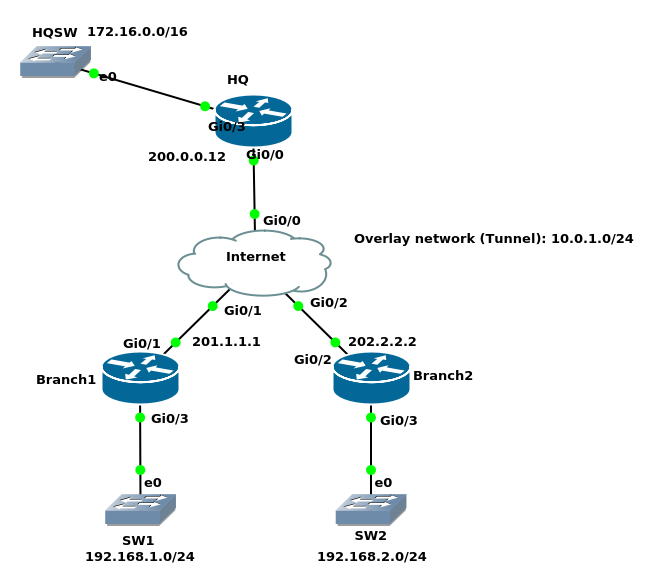
Here is the configuration of DMVPN phase 2 on tunnel 0
HQinterface Tunnel0 ip address 10.0.1.12 255.255.255.0 no ip redirects ip nhrp map multicast dynamic ip nhrp network-id 1 tunnel source GigabitEthernet0/0 tunnel mode gre multipointBranch1:
interface Tunnel0
 ip address 10.0.1.1 255.255.255.0
 no ip redirects
 ip nhrp map multicast 200.0.0.12
 ip nhrp map 10.0.1.12 200.0.0.12
 ip nhrp network-id 1
 ip nhrp nhs 10.0.1.12
 tunnel source GigabitEthernet0/1
 tunnel mode gre multipoint
Branch2
interface Tunnel0
 ip address 10.0.1.1 255.255.255.0
 no ip redirects
 ip nhrp map multicast 200.0.0.12
 ip nhrp map 10.0.1.12 200.0.0.12
 ip nhrp network-id 1
 ip nhrp nhs 10.0.1.12
 tunnel source GigabitEthernet0/1
 tunnel mode gre multipoint
DMVPN Phase 3 Configuration
To migrate from phase 2 to phase 3 we only need two more tunnel interface subcommands
ip nhrp redirecton HQ: will inform the branches that they can reach another branch directlyip nhrp shortcuton Branches: to make changes in CEF entry when they receive a redirect message from the hub
HQ(config)#interface tunnel 0
HQ(config-if)#ip nhrp redirect
Spoke1 & Spoke2(config)#interface tunnel 0
Spoke1 & Spoke2(config-if)#ip nhrp shortcut
Unlike the DMVPN phase 2, branches do not need specific entries in their routing table.
RIP configuration
HQ(config)#router rip
HQ(config-router)#version 2
HQ(config-router)#network 10.0.1.12
HQ(config-router)#default-information originate
Branch1(config)#router rip
Branch1(config-router)#version 2
Branch1(config-router)#network 10.0.1.1
Branch1(config-router)#network 192.168.1.1
Branch2(config)#router rip
Branch2(config-router)#version 2
Branch2(config-router)#network 10.0.1.2
Branch2(config-router)#network 192.168.2.2
Branch1#traceroute 192.168.2.2 source 192.168.1.1
Type escape sequence to abort.
Tracing the route to 192.168.2.2
VRF info: (vrf in name/id, vrf out name/id)
  1 10.0.1.2 8 msec 9 msec 11 msec

Branch1#show dmvpn
Legend: Attrb --> S - Static, D - Dynamic, I - Incomplete
    T1 - Route Installed, T2 - Nexthop-override
==========================================================================
Interface: Tunnel0, IPv4 NHRP Details
Type:Spoke, NHRP Peers:2,

 # Ent  Peer NBMA Addr Peer Tunnel Add State  UpDn Tm Attrb
 ----- --------------- --------------- ----- -------- -----
     2 202.2.2.2              10.0.1.2    UP 00:10:28   DT1
                              10.0.1.2    UP 00:10:28   DT1
     1 200.0.0.12            10.0.1.12    UP 02:47:22     S
EIGRP configuration
- I already removed all RIP configuration
- EIGRP on DMVPN phase 3 works very well
- No need to disable split horizon since the spoke routers do not have to learn each other’s networks
HQ(config)#router eigrp 120
HQ(config-router)#network 10.0.1.12 0.0.0.0
HQ(config)#interface tunnel 0 HQ(config-if)#ip summary-address eigrp 120 0.0.0.0 0.0.0.0
Branch1(config)#router eigrp 120
Branch1(config-router)#network 10.0.1.1 0.0.0.0
Branch1(config-router)#network 192.168.1.1 0.0.0.0
Branch2(config)#router eigrp 120
Branch2(config-router)#network 10.0.1.2 0.0.0.0
Branch2(config-router)#network 192.168.2.2 0.0.0.0
HQ#show ip route eigrp
Gateway of last resort is 0.0.0.0 to network 0.0.0.0

D*    0.0.0.0/0 is a summary, 00:00:33, Null0
D     192.168.1.0/24 [90/26880256] via 10.0.1.1, 00:04:31, Tunnel0
D     192.168.2.0/24 [90/26880256] via 10.0.1.2, 00:03:53, Tunnel0
Branch1#show ip route eigrp
Gateway of last resort is 10.0.1.12 to network 0.0.0.0

D*    0.0.0.0/0 [90/28160000] via 10.0.1.12, 00:00:41, Tunnel0

Branch1#show dmvpn
Legend: Attrb --> S - Static, D - Dynamic, I - Incomplete
    T1 - Route Installed, T2 - Nexthop-override
==========================================================================

Interface: Tunnel0, IPv4 NHRP Details
Type:Spoke, NHRP Peers:2,

 # Ent  Peer NBMA Addr Peer Tunnel Add State  UpDn Tm Attrb
 ----- --------------- --------------- ----- -------- -----
     2 202.2.2.2              10.0.1.2    UP 00:25:35   DT1
                              10.0.1.2    UP 00:25:35   DT1
     1 200.0.0.12            10.0.1.12    UP 03:02:29     S

Branch1#show ip route nhrp
       o - ODR, P - periodic downloaded static route, H - NHRP, l - LISP

Gateway of last resort is 10.0.1.12 to network 0.0.0.0

      10.0.0.0/8 is variably subnetted, 3 subnets, 2 masks
H        10.0.1.2/32 is directly connected, 00:26:27, Tunnel0
H     192.168.2.0/24 [250/255] via 10.0.1.2, 00:03:11, Tunnel0
OSPF configuration
- I already removed EIGRP configuration
- OSPF is not the best choice for DMVPN phase 3
broadcast OSPF network type
- Will work
HQ & Spokes(config)#interface tunnel 0
HQ & Spokes(config-if)#ip ospf network broadcast
Branch1 & Branch2(config-if)#ip ospf priority 0
HQ(config)#router ospf 1
HQ(config-router)#network 172.16.0.12 0.0.0.0 area 0
HQ(config-router)#network 10.0.1.12 0.0.0.0 area 1
Branch1(config)#router ospf 1
Branch1(config-router)#network 10.0.1.1 0.0.0.0 area 1
Branch1(config-router)#network 192.168.1.1 0.0.0.0 area 1
Branch2(config)#router ospf 1
Branch2(config-router)#network 10.0.1.2 0.0.0.0 area 1
Branch2(config-router)#network 192.168.2.2 0.0.0.0 area 1
HQ#show ip route ospf
Gateway of last resort is not set

O     192.168.1.0/24 [110/1001] via 10.0.1.1, 00:02:24, Tunnel0
O     192.168.2.0/24 [110/1001] via 10.0.1.2, 00:01:35, Tunnel0
Branch1#show ip route ospf
Gateway of last resort is not set

      172.16.0.0/20 is subnetted, 1 subnets
O IA     172.16.0.0 [110/1001] via 10.0.1.12, 00:02:42, Tunnel0
O     192.168.2.0/24 [110/1001] via 10.0.1.2, 00:01:43, Tunnel0

Branch1#traceroute 192.168.2.2 source 192.168.1.1
Type escape sequence to abort.
Tracing the route to 192.168.2.2
VRF info: (vrf in name/id, vrf out name/id)
  1 10.0.1.2 9 msec 7 msec 9 msec
point-to-multipoint OSPF network type
- In DMVPN phase 2 we could not use this type of network
- In DMVPN phase 3 if we have to configure OSPF, this network type is the best choice since you do not have to worry about DR/BDR election
HQ & Spokes(config)#interface tunnel 0
HQ#show ip ospf neighbor

Neighbor ID     Pri   State           Dead Time   Address         Interface
202.2.2.2         0   FULL/  -        00:01:55    10.0.1.2        Tunnel0
201.1.1.1         0   FULL/  -        00:01:56    10.0.1.1        Tunnel0
Branch1#show ip route ospf
       + - replicated route, % - next hop override, p - overrides from PfR
Gateway of last resort is not set

      10.0.0.0/8 is variably subnetted, 4 subnets, 2 masks
O   %    10.0.1.2/32 [110/2000] via 10.0.1.12, 00:00:35, Tunnel0
O        10.0.1.12/32 [110/1000] via 10.0.1.12, 00:00:45, Tunnel0
      172.16.0.0/20 is subnetted, 1 subnets
O IA     172.16.0.0 [110/1001] via 10.0.1.12, 00:00:45, Tunnel0
O     192.168.2.0/24 [110/2001] via 10.0.1.12, 00:00:35, Tunnel0

Branch1#show ip cef 192.168.2.2
192.168.2.0/24
  nexthop 10.0.1.12 Tunnel0

Branch1#traceroute 192.168.2.2 source 192.168.1.1
Type escape sequence to abort.
Tracing the route to 192.168.2.2
VRF info: (vrf in name/id, vrf out name/id)
  1 10.0.1.12 8 msec 8 msec 9 msec
  2 10.0.1.2 15 msec 38 msec 12 msec
First traceroute went through the HQ, but in the second try traffic went directly to Branch2
Branch1#traceroute 192.168.2.2 source 192.168.1.1
Type escape sequence to abort.
Tracing the route to 192.168.2.2
VRF info: (vrf in name/id, vrf out name/id)
  1 10.0.1.2 8 msec 7 msec 7 msec

Branch1#show ip cef 192.168.2.2
192.168.2.0/24
  nexthop 10.0.1.2 Tunnel0

Branch1#show dmvpn
T1 - Route Installed, T2 - Nexthop-override
Interface: Tunnel0, IPv4 NHRP Details
Type:Spoke, NHRP Peers:2,

 # Ent  Peer NBMA Addr Peer Tunnel Add State  UpDn Tm Attrb
 ----- --------------- --------------- ----- -------- -----
     2 202.2.2.2              10.0.1.2    UP 00:01:03   DT2
                              10.0.1.2    UP 00:01:03   DT2
     1 200.0.0.12            10.0.1.12    UP 00:04:03     S
BGP Configuration
- I removed all previous configuration related to OSPF
iBGP with dynamic peers
HQ(config)#ip route 0.0.0.0 0.0.0.0 null 0
HQ(config)#router bgp 64500
HQ(config-router)#bgp listen range 10.0.1.0/24 peer-group DMVPN_BRANCHES
HQ(config-router)#neighbor DMVPN_BRANCHES peer-group
HQ(config-router)#neighbor DMVPN_BRANCHES remote-as 64500
HQ(config-router)#network 0.0.0.0 mask 0.0.0.0
Branch1(config)#router bgp 64500
Branch1(config-router)#neighbor 10.0.1.12 remote-as 64500
Branch1(config-router)#network 192.168.1.0 mask 255.255.255.0
Branch2(config)#router bgp 64500
Branch2(config-router)#neighbor 10.0.1.12 remote-as 64500
Branch2(config-router)#network 192.168.2.0 mask 255.255.255.0
HQ(config-router)#do sho ip bgp nei 10.0.1.1 adv

     Network          Next Hop            Metric LocPrf Weight Path
 *>  0.0.0.0          0.0.0.0                  0         32768 i
Branch1(config-if)#do sho ip route bgp
Gateway of last resort is 10.0.1.12 to network 0.0.0.0

B*    0.0.0.0/0 [200/0] via 10.0.1.12, 00:00:28

Branch1#traceroute 192.168.2.2 source 192.168.1.1
Type escape sequence to abort.
Tracing the route to 192.168.2.2
VRF info: (vrf in name/id, vrf out name/id)
  1 10.0.1.12 8 msec 7 msec 5 msec
  2 10.0.1.2 12 msec 9 msec 6 msec

Branch1#traceroute 192.168.2.2 source 192.168.1.1
Type escape sequence to abort.
Tracing the route to 192.168.2.2
VRF info: (vrf in name/id, vrf out name/id)
  1 10.0.1.2 10 msec 9 msec 7 msec

Branch1#show ip route nhrp
       o - ODR, P - periodic downloaded static route, H - NHRP, l - LISP
Gateway of last resort is 10.0.1.12 to network 0.0.0.0

      10.0.0.0/8 is variably subnetted, 3 subnets, 2 masks
H        10.0.1.2/32 is directly connected, 00:01:10, Tunnel0
H     192.168.2.0/24 [250/255] via 10.0.1.2, 00:01:10, Tunnel0

Branch1#show dmvpn
Legend: Attrb --> S - Static, D - Dynamic, I - Incomplete
    T1 - Route Installed, T2 - Nexthop-override
==========================================================================

Interface: Tunnel0, IPv4 NHRP Details
Type:Spoke, NHRP Peers:2,

 # Ent  Peer NBMA Addr Peer Tunnel Add State  UpDn Tm Attrb
 ----- --------------- --------------- ----- -------- -----
     2 202.2.2.2              10.0.1.2    UP 00:01:39   DT1
                              10.0.1.2    UP 00:01:39   DT1
     1 200.0.0.12            10.0.1.12    UP 00:25:06     S