Multiple Spanning Tree (MST) - IEEE 802.1s standard
ccnp-switching
Why Multiple Spanning Tree (802.1s) maps VLANs to a few instances, how MST regions form, and how to configure instances and root bridges.
By default Cisco Catalyst Switches run PVST+ or Rapid PVST+ (Per VLAN Spanning Tree). This means that each VLAN is mapped to a single spanning tree instance. When you have 200 VLANs, it means there are 200 instances of spanning tree. This requires a lot of CPU power and memory.
PVST+ vs MST
- PVST+:
- One instance per VLAN
- 1 VLAN = 1 Instance
- 200 VLAN = 200 Instances
- Cannot change VLAN-to-instance relationship
- A default instance for VLAN 1 always exists
- One instance per VLAN
- MST:
- VLANs can be arbitrarily mapped to instances
- VLANs 1, 5, 7 = 1 instance
- VLANs 2, 20, 200 = 1 instance
- You define VLAN-to-instance mappings
- MST0 is the default instance for all VLANs (1-4094)
- MST0 is also called the Internal Spanning Tree (IST)
- VLANs can be arbitrarily mapped to instances
MST works with the concept of regions. Switches that are configured to use MST need to find out if their neighbors are running MST.
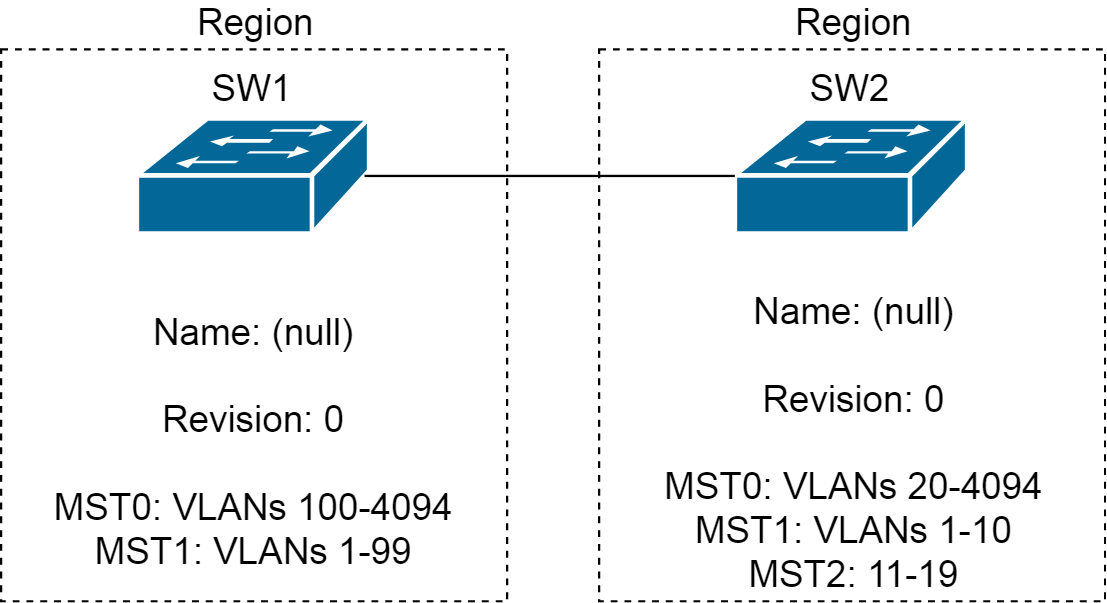
When switches have the same attributes they will be in the same region. It is possible to have one or more regions and here are the attributes that need to match. (YOU explicitly configure these attributes):
- MST configuration name.
- MST configuration revision number.
- MST instance-to-VLAN mapping table.
Example - These are in different regions
Example - These are in the same region
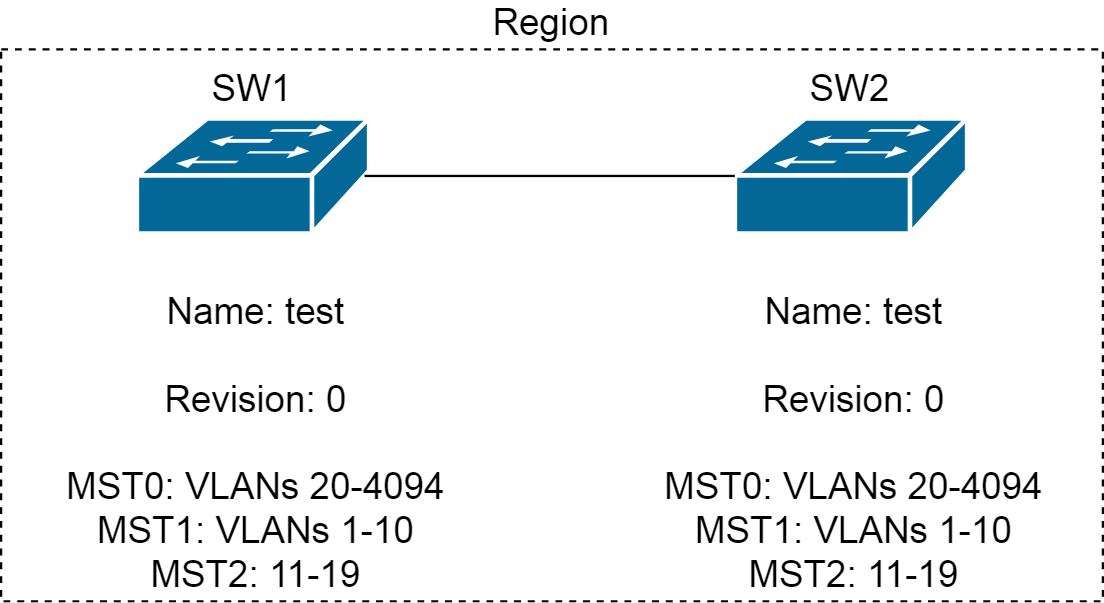
So, here both switches can run MST with each other.
Configuration
Creating VLANs on Distribution_1, Distribution_2, and Access:(config)#vlan 10 (config-vlan)#vlan 20 (config-vlan)#vlan 30 (config-vlan)#vlan 40 (config-vlan)#exitTrunking ports in between the switches:
(config-if)#switchport trunk encapsulation dot1q
(config-if)#switchport mode trunk
Then we configure spanning-tree MST on all switches as below:
(config)#spanning-tree mode mst
(config)#spanning-tree mst configuration
(config-mst)#name test
(config-mst)#revision 1
(config-mst)#instance 1 vlan 1,10
(config-mst)#instance 2 vlan 20,30,40
(config-mst)#exit
(config)#spanning-tree mst configuration
(config-mst)#show
Pending MST configuration
Name      [test]
Revision  1     Instances configured 3

Instance  Vlans mapped
--------  ---------------------------------------------------------------------
0         1-9,11-19,21-29,31-39,41-4094
1         10,20
2         30,40
-------------------------------------------------------------------------------
Verification
Access#show spanning-tree mst configuration
Name      [test]
Revision  1     Instances configured 3

Instance  Vlans mapped
--------  ---------------------------------------------------------------------
0         1-9,11-19,21-29,31-39,41-4094
1         10,20
2         30,40
-------------------------------------------------------------------------------
Distribution_1#show spanning-tree

MST0
  Spanning tree enabled protocol mstp
  Root ID    Priority    32768
             Address     001d.707b.4200
             This bridge is the root
             Hello Time   2 sec  Max Age 20 sec  Forward Delay 15 sec

  Bridge ID  Priority    32768  (priority 32768 sys-id-ext 0)
             Address     001d.707b.4200
             Hello Time   2 sec  Max Age 20 sec  Forward Delay 15 sec

Interface           Role Sts Cost      Prio.Nbr Type
------------------- ---- --- --------- -------- --------------------------------
Fa1/0/23            Desg FWD 200000    128.25   P2p
Fa1/0/24            Desg FWD 200000    128.26   P2p


MST1
  Spanning tree enabled protocol mstp
  Root ID    Priority    32769
             Address     001d.707b.4200
             This bridge is the root
             Hello Time   2 sec  Max Age 20 sec  Forward Delay 15 sec

  Bridge ID  Priority    32769  (priority 32768 sys-id-ext 1)
             Address     001d.707b.4200
             Hello Time   2 sec  Max Age 20 sec  Forward Delay 15 sec

Interface           Role Sts Cost      Prio.Nbr Type
------------------- ---- --- --------- -------- --------------------------------
Fa1/0/23            Desg FWD 200000    128.25   P2p
Fa1/0/24            Desg FWD 200000    128.26   P2p


MST2
  Spanning tree enabled protocol mstp
  Root ID    Priority    32770
             Address     001d.707b.4200
             This bridge is the root
             Hello Time   2 sec  Max Age 20 sec  Forward Delay 15 sec

  Bridge ID  Priority    32770  (priority 32768 sys-id-ext 2)
             Address     001d.707b.4200
             Hello Time   2 sec  Max Age 20 sec  Forward Delay 15 sec

Interface           Role Sts Cost      Prio.Nbr Type
------------------- ---- --- --------- -------- --------------------------------
Fa1/0/23            Desg FWD 200000    128.25   P2p
Fa1/0/24            Desg FWD 200000    128.26   P2p
As you can see above, Distribution_1 is root for all MST instances which is not very efficient. Now, we want Distribution_1 to be the root bridge for MST0, and Distribution_2 to be root bridge for MST1 and MST2.
Distribution_1(config)#spanning-tree mst 0 root primary
Distribution_1(config)#spanning-tree mst 1,2 root secondary
Distribution_2(config)#spanning-tree mst 0 root secondary
Distribution_2(config)#spanning-tree mst 1,2 root primary
To verify:
Distribution_1#show spanning-tree

MST0
  Spanning tree enabled protocol mstp
  Root ID    Priority    24576
             Address     001d.707b.4200
             This bridge is the root
             Hello Time   2 sec  Max Age 20 sec  Forward Delay 15 sec

  Bridge ID  Priority    24576  (priority 24576 sys-id-ext 0)
             Address     001d.707b.4200
             Hello Time   2 sec  Max Age 20 sec  Forward Delay 15 sec

Interface           Role Sts Cost      Prio.Nbr Type
------------------- ---- --- --------- -------- --------------------------------
Fa1/0/23            Desg FWD 200000    128.25   P2p
Fa1/0/24            Desg FWD 200000    128.26   P2p


MST1
  Spanning tree enabled protocol mstp
  Root ID    Priority    24577
             Address     0022.0dec.1200
             Cost        200000
             Port        26 (FastEthernet1/0/24)
             Hello Time   2 sec  Max Age 20 sec  Forward Delay 15 sec

  Bridge ID  Priority    28673  (priority 28672 sys-id-ext 1)
             Address     001d.707b.4200
             Hello Time   2 sec  Max Age 20 sec  Forward Delay 15 sec

Interface           Role Sts Cost      Prio.Nbr Type
------------------- ---- --- --------- -------- --------------------------------
Fa1/0/23            Desg FWD 200000    128.25   P2p
Fa1/0/24            Root FWD 200000    128.26   P2p


MST2
  Spanning tree enabled protocol mstp
  Root ID    Priority    24578
             Address     0022.0dec.1200
             Cost        200000
             Port        26 (FastEthernet1/0/24)
             Hello Time   2 sec  Max Age 20 sec  Forward Delay 15 sec

  Bridge ID  Priority    28674  (priority 28672 sys-id-ext 2)
             Address     001d.707b.4200
             Hello Time   2 sec  Max Age 20 sec  Forward Delay 15 sec

Interface           Role Sts Cost      Prio.Nbr Type
------------------- ---- --- --------- -------- --------------------------------
Fa1/0/23            Desg FWD 200000    128.25   P2p
Fa1/0/24            Root FWD 200000    128.26   P2p
Tuning MST timers
(config)#spanning-tree mst ?
  WORD           MST instance range, example: 0-3,5,7-9
  configuration  Enter MST configuration submode
  forward-time   Set the forward delay for the spanning tree
  hello-time     Set the hello interval for the spanning tree
  max-age        Set the max age interval for the spanning tree
  max-hops       Set the max hops value for the spanning tree