First-hop redundancy protocols (FHRP) - RFC 2281
ccnp-switching
Lab notes on first hop redundancy, configuring HSRP with tracking and timers, VRRP preemption, and GLBP load balancing on Cisco switches and routers.
- Proper functioning of the FHRP depends on proper functioning of layer 2
- I will be configuring them on switches but we can use routers as well
LAB Setup
Topology
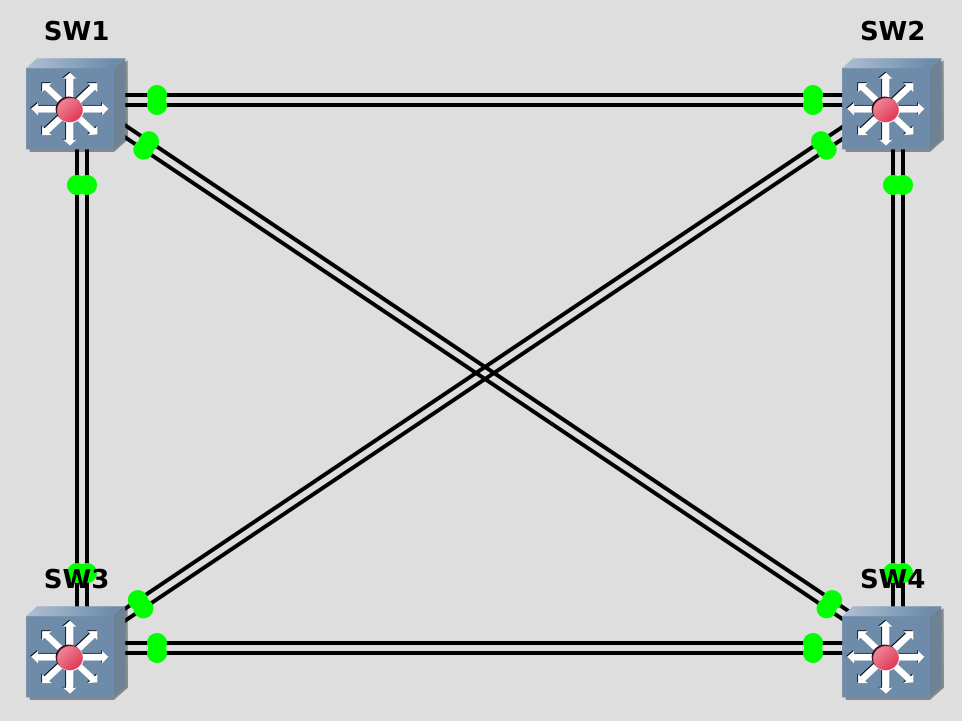
Portmapping
from SW1 Gi1/2 to SW2 Gi1/2
from SW1 Gi2/1 to SW2 Gi2/1
from SW1 Gi1/3 to SW3 Gi1/3
from SW1 Gi3/1 to SW3 Gi3/1
from SW1 Gi0/1 to SW4 Gi0/1
from SW1 Gi1/0 to SW4 Gi1/0
from SW2 Gi2/3 to SW3 Gi2/3
from SW2 Gi0/2 to SW4 Gi0/2
from SW2 Gi2/0 to SW4 Gi2/0
from SW3 Gi3/2 to SW2 Gi3/2
from SW3 Gi0/3 to SW4 Gi0/3
from SW3 Gi3/0 to SW4 Gi3/0
Hot Standby Router Protocol (HSRP)
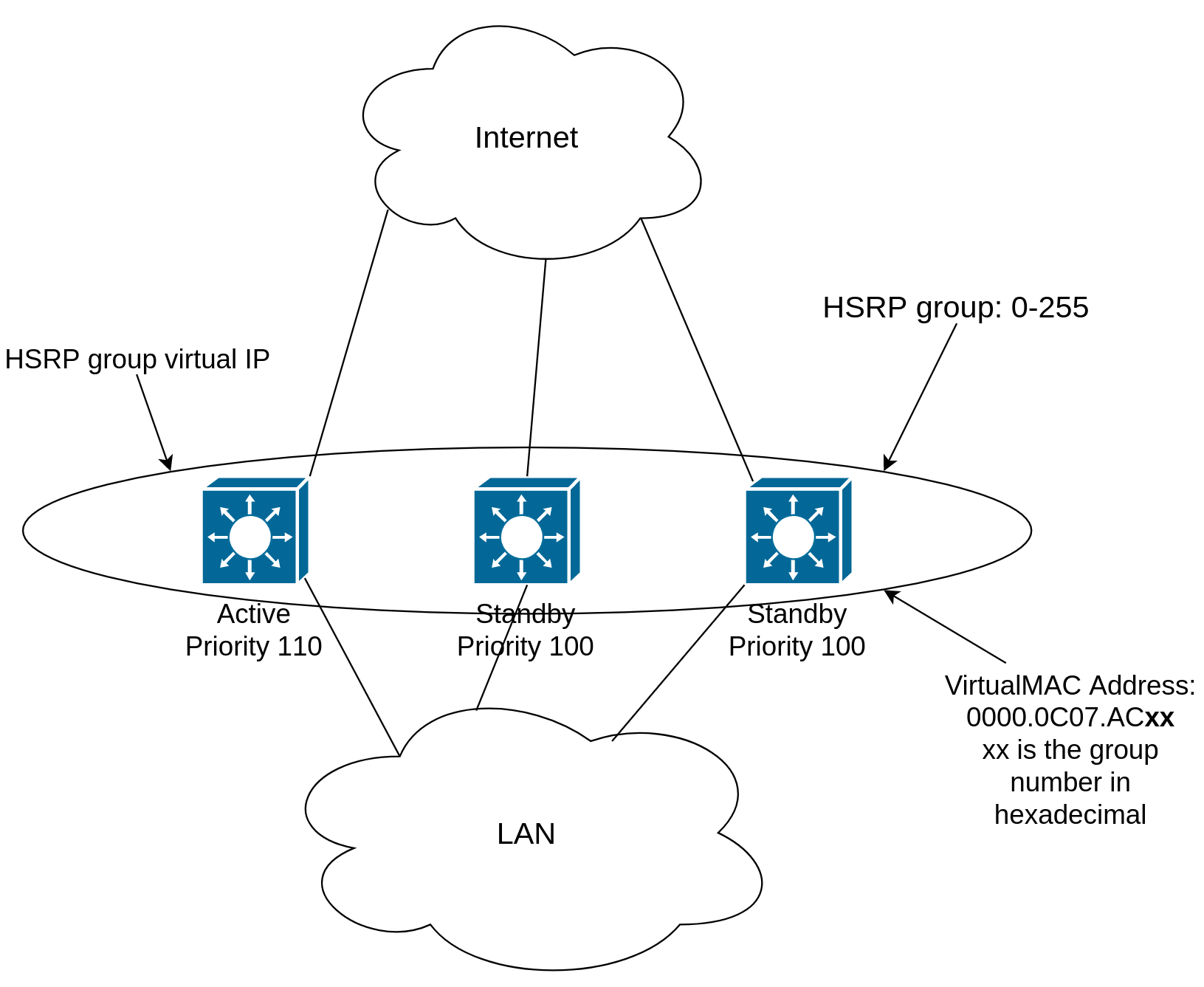
Configuration
- Configure SW1 and SW2 according to the table below
- Enable IP routing on both switches
| VLAN | SVI | |
|---|---|---|
| SW1 | 10 | 172.31.10.1/24 |
| SW1 | 20 | 172.31.20.1/24 |
| SW2 | 10 | 172.31.10.2/24 |
| SW2 | 20 | 172.31.20.2/24 |
- All HSRP Configurations are under the SVI configuration mode
- Make sure SW1 is always the active router for VLAN 10
- Make sure SW2 is always the passive router for VLAN 10
- Use the virtual IP address 172.31.10.254
SW1(config)#interface vlan 10
SW1(config-if)#standby 10 ip 172.31.10.254
SW1(config-if)#standby 10 priority 110
SW1(config-if)#standby 10 preempt
SW2(config)#interface vlan 10
SW2(config-if)#standby 10 ip 172.31.10.254
SW1#show standby
Vlan10 - Group 10
State is Active
2 state changes, last state change 00:31:07
Virtual IP address is 172.31.10.254
Active virtual MAC address is 0000.0c07.ac0a (MAC In Use)
Local virtual MAC address is 0000.0c07.ac0a (v1 default)
Hello time 3 sec, hold time 10 sec
Next hello sent in 0.432 secs
Preemption enabled
Active router is local
Standby router is 172.31.10.2, priority 100 (expires in 10.784 sec)
Priority 110 (configured 110)
Group name is "hsrp-Vl10-10" (default)
- What if you want to trigger the failover based on something less catastrophic than switch failure?
- If either Gi1/2 or Gi2/1 on SW1 goes down, ensure that SW2 becomes the active router for VLAN 10.
SW1(config)#int vlan 10
SW1(config-if)#standby 10 track 1 decrement 11
SW1(config-if)#standby 10 track 2 decrement 11
SW1(config)#track 1 interface gigabitEthernet 1/2 line-protocol
SW1(config-track)#exit
SW1(config)#track 2 interface gigabitEthernet 2/1 line-protocol
SW1(config-track)#end
SW1#show track
Track 1
Interface GigabitEthernet1/2 line-protocol
Line protocol is Up
1 change, last change 00:04:51
Tracked by:
HSRP Vlan10 10
Track 2
Interface GigabitEthernet2/1 line-protocol
Line protocol is Up
1 change, last change 00:02:20
Tracked by:
HSRP Vlan10 10
SW1#show standby
Vlan10 - Group 10
State is Active
2 state changes, last state change 00:52:17
Virtual IP address is 172.31.10.254
Active virtual MAC address is 0000.0c07.ac0a (MAC In Use)
Local virtual MAC address is 0000.0c07.ac0a (v1 default)
Hello time 3 sec, hold time 10 sec
Next hello sent in 1.920 secs
Preemption enabled
Active router is local
Standby router is 172.31.10.2, priority 100 (expires in 9.536 sec)
Priority 110 (configured 110)
Track object 1 state Up decrement 11
Track object 2 state Up decrement 11
Group name is "hsrp-Vl10-10" (default)
- If either Gi1/2 or Gi2/1 on SW1 goes down, ensure that SW2 becomes the active router for VLAN 10.
SW1(config)#interface gigabitEthernet 1/2
SW1(config-if)#shutdown
SW1(config-if)#
*Nov 23 00:12:28.842: %TRACK-6-STATE: 1 interface Gi1/2 line-protocol Up -> Down
*Nov 23 00:12:30.813: %LINK-5-CHANGED: Interface GigabitEthernet1/2, changed state to administratively down
*Nov 23 00:12:31.813: %LINEPROTO-5-UPDOWN: Line protocol on Interface GigabitEthernet1/2, changed state to down
Nothing happened. Now we have to configure SW2 so that it preempts SW1
SW2(config)#interface vlan 10
SW2(config-if)#standby 10 preempt
*Nov 23 00:12:36.683: %HSRP-5-STATECHANGE: Vlan10 Grp 10 state Standby -> Active
SW1#
*Nov 23 00:14:35.206: %HSRP-5-STATECHANGE: Vlan10 Grp 10 state Active -> Speak
*Nov 23 00:14:46.800: %HSRP-5-STATECHANGE: Vlan10 Grp 10 state Speak -> Standby
SW1#show standby
Vlan10 - Group 10
  State is Standby
    4 state changes, last state change 00:02:09
  Virtual IP address is 172.31.10.254
  Active virtual MAC address is 0000.0c07.ac0a (MAC Not In Use)
    Local virtual MAC address is 0000.0c07.ac0a (v1 default)
  Hello time 3 sec, hold time 10 sec
    Next hello sent in 2.448 secs
  Preemption enabled
  Active router is 172.31.10.2, priority 100 (expires in 7.568 sec)
  Standby router is local
  Priority 99 (configured 110)
    Track object 1 state Down decrement 11
    Track object 2 state Up decrement 11
  Group name is "hsrp-Vl10-10" (default)
HSRP Timers
HSRP routers send Hello to 224.0.0.2 UDP 1985 every 3 seconds. Hold time is 10 seconds.
HSRP routers are listening to multicast address 224.0.0.2
SW1#show ip interface vlan 10  | i Multicast
Multicast reserved groups joined: 224.0.0.2
The timers configured on an active router always override any other timer settings
SW1(config-if)#standby 10 timers 2 7
SW1#show standby vlan 10
Vlan10 - Group 10
State is Standby
  1 state change, last state change 01:29:12
Virtual IP address is 172.31.10.254
Active virtual MAC address is 0000.0c07.ac0a (MAC Not In Use)
  Local virtual MAC address is 0000.0c07.ac0a (v1 default)
Hello time 3 sec (cfgd 2 sec), hold time 10 sec (cfgd 7 sec)
  Next hello sent in 0.640 secs
Preemption enabled
Active router is 172.31.10.2, priority 100 (expires in 8.416 sec)
Standby router is local
Priority 99 (configured 110)
  Track object 1 state Down decrement 11
  Track object 2 state Up decrement 11
Group name is "hsrp-Vl10-10" (default)
SW1(config)#interface gigabitEthernet 1/2
SW1(config-if)#no shutdown
SW1#show standby vlan 10
Vlan10 - Group 10
  State is Active
    2 state changes, last state change 00:01:34
  Virtual IP address is 172.31.10.254
  Active virtual MAC address is 0000.0c07.ac0a (MAC In Use)
    Local virtual MAC address is 0000.0c07.ac0a (v1 default)
  Hello time 2 sec, hold time 7 sec
    Next hello sent in 0.064 secs
  Preemption enabled
  Active router is local
  Standby router is 172.31.10.2, priority 100 (expires in 5.664 sec)
  Priority 110 (configured 110)
    Track object 1 state Up decrement 11
    Track object 2 state Up decrement 11
  Group name is "hsrp-Vl10-10" (default)
HSRP Authentication
- To prevent unexpected devices from spoofing or participating in HSRP
- All routers in the same standby group must have an identical authentication method and key
Plain-Text HSRP Authentication
- Up to 8 characters
SW1(config-if)#standby 20 authentication cisco
MD5 Authentication
- Up to 64 characters
MD5 Authentication using a key-string
SW1(config-if)#standby 20 authentication md5 key-string cisco
MD5 Authentication using key-chain
SW1(config)#key chain CHAIN-HSRP-20
SW1(config-keychain)#key 51
SW1(config-keychain-key)#key-string cisco
SW1(config)#interface vlan 20
SW1(config-if)#standby 20 authentication md5 key-chain CHAIN-HSRP-20
- Note that
- HSRP and STP do NOT have any negotiation with each other, so to increase the performance, you have to design the HSRP Active to be the STP root bridge as well
- HSRP version 1 is the default version
- the identifier is not the HSRP group; it is the Virtual IP address
- If the priorities are the same, the switch with higher SVI IP becomes active
- HSRP has 5 states: Initial, listen, speak, standby and active.
- Initial: This is the beginning state. It indicates HSRP is not running. It happens when the configuration changes or the interface is first turned on
- Learn: The router has not determined the virtual IP address and has not yet seen an authenticated hello message from the active router. In this state, the router still waits to hear from the active router
- Listen: The router knows both IP and MAC address of the virtual router but it is not the active or standby router. For example, if there are 3 routers in HSRP group, the router which is not in active or standby state will remain in listen state.
- Speak: The router sends periodic HSRP hellos and participates in the election of the active or standby router.
- Standby: In this state, the router monitors hellos from the active router and it will take the active state when the current active router fails (no packets heard from active router)
- Active: The router forwards packets that are sent to the HSRP group. The router also sends periodic hello messages
HSRP Version 2
- Supports 4096 group numbers
- Virtual MAC address of 0000.0C9F.FXXX (XXX: HSRP group in hexadecimal)
- Hello packets are sent to multicast address 224.0.0.102
- Is configured by
(config-if)# standby version 2
Virtual Router Redundancy Protocol (VRRP)
- VRRP is an open standard protocol defined in RFC 3768
- Virtual MAC: 0000.5e00.01xx (xx is the group number in hexadecimal format)
- Master router:
- Equivalent to the HSRP Active router
- Listens to the virtual MAC and IP address
- Backup router
- Equivalent to the HSRP Standby router
- In VRRP (unlike HSRP) the virtual IP address can be the same as an interface IP
- Allows new VRRP implementation without changing default gateways of the computers
- The switch whose interface IP matches the virtual IP will always be the master unless it is down
- VRRP group number: [1-255] (in HSRP: [0-255], where 0 is the default group number)
- Router priority is between and including [0-255] (in HSRP it was [0-255])
- Note that the default VRRP priority number of Master if chosen by IP address is 255
- default VRRP priority number of backups is 100
- We can NOT configure a router with priority 0. Priority 0 happens when we decrement to 0 by tracking objects
- Hellos are being sent in a 1-second interval
- hold time is 3 seconds
- Multicast address: 224.0.0.18 IP protocol number 112
- In VRRP the preemption is enabled by default
Configuration
- Create VLAN 34 on SW3 and SW4
- Assign IP addresses as below:
- SW3: 172.31.34.3/24
- SW4: 172.31.34.4/24
- SW4 should be the Master whenever possible
SW3(config)#int vl 34
SW3(config-if)#vrrp 34 ip 172.31.34.4
SW4(config)#int vl 34
SW4(config-if)#vrrp 34 ip 172.31.34.4
*Nov 24 15:22:39.230: %VRRP-6-STATECHANGE: Vl34 Grp 34 state Init -> Master
*Nov 24 15:22:39.262: %VRRP-6-STATECHANGE: Vl34 Grp 34 state Init -> Master
SW4#show vrrp
Vlan34 - Group 34
  State is Master
  Virtual IP address is 172.31.34.4
  Virtual MAC address is 0000.5e00.0122
  Advertisement interval is 1.000 sec
  Preemption enabled
  Priority is 255
  Master Router is 172.31.34.4 (local), priority is 255
  Master Advertisement interval is 1.000 sec
  Master Down interval is 3.003 sec
- Ensure that SW3 takes over as the Master if Gi0/3 on SW4 goes down
SW4(config)#track 34 interface gigabitEthernet 0/3 line-protocol
SW4(config-track)#exit
SW4(config)#interface vlan 34
SW4(config-if)#vrrp 34 track 34 decrement 156
VRRP: Tracking not supported on IP Address owner
SW4(config-if)#ip address 172.31.34.44 255.255.255.0
*Nov 24 17:52:36.218: %VRRP-6-STATECHANGE: Vl34 Grp 34 state Master -> Disable
*Nov 24 17:52:36.219: %VRRP-6-STATECHANGE: Vl34 Grp 34 state Init -> Backup
*Nov 24 17:52:36.224: %VRRP-6-STATECHANGE: Vl34 Grp 34 state Backup -> Disable
*Nov 24 17:52:36.225: %VRRP-6-STATECHANGE: Vl34 Grp 34 state Init -> Backup
*Nov 24 17:52:39.834: %VRRP-6-STATECHANGE: Vl34 Grp 34 state Backup -> Master
SW4(config-if)#vrrp 34 track 34 decrement 1
SW4#show vrrp
Vlan34 - Group 34
  State is Master
  Virtual IP address is 172.31.34.4
  Virtual MAC address is 0000.5e00.0122
  Advertisement interval is 1.000 sec
  Preemption enabled
  Priority is 100
 Track object 34 state Up decrement 1
  Master Router is 172.31.34.44 (local), priority is 100
  Master Advertisement interval is 1.000 sec
  Master Down interval is 3.609 sec
SW4(config)#interface gigabitEthernet 0/3
SW4(config-if)#shutdown
SW4(config-if)#
*Nov 24 17:56:36.660: %TRACK-6-STATE: 34 interface Gi0/3 line-protocol Up -> Down
*Nov 24 17:56:38.624: %LINK-5-CHANGED: Interface GigabitEthernet0/3, changed state to administratively down
*Nov 24 17:56:39.624: %LINEPROTO-5-UPDOWN: Line protocol on Interface GigabitEthernet0/3, changed state to down
*Nov 24 17:56:40.124: %VRRP-6-STATECHANGE: Vl34 Grp 34 state Master -> Backup
SW4#show vrrp
Vlan34 - Group 34
  State is Backup
  Virtual IP address is 172.31.34.4
  Virtual MAC address is 0000.5e00.0122
  Advertisement interval is 1.000 sec
  Preemption enabled
  Priority is 99
 Track object 34 state Down decrement 1
  Master Router is 172.31.34.3, priority is 100
  Master Advertisement interval is 1.000 sec
  Master Down interval is 3.609 sec (expires in 3.421 sec)
We can see SW3 preempts SW4 when the interface comes back up.SW4(config)#interface gigabitEthernet 0/3 SW4(config-if)#no shutdown SW4(config-if)# *Nov 24 18:01:57.961: %LINK-3-UPDOWN: Interface GigabitEthernet0/3, changed state to up *Nov 24 18:01:57.963: %TRACK-6-STATE: 34 interface Gi0/3 line-protocol Down -> Up *Nov 24 18:01:58.961: %LINEPROTO-5-UPDOWN: Line protocol on Interface GigabitEthernet0/3, changed state to up *Nov 24 18:02:01.373: %VRRP-6-STATECHANGE: Vl34 Grp 34 state Backup -> Master
Gateway Load Balancing Protocol (GLBP)
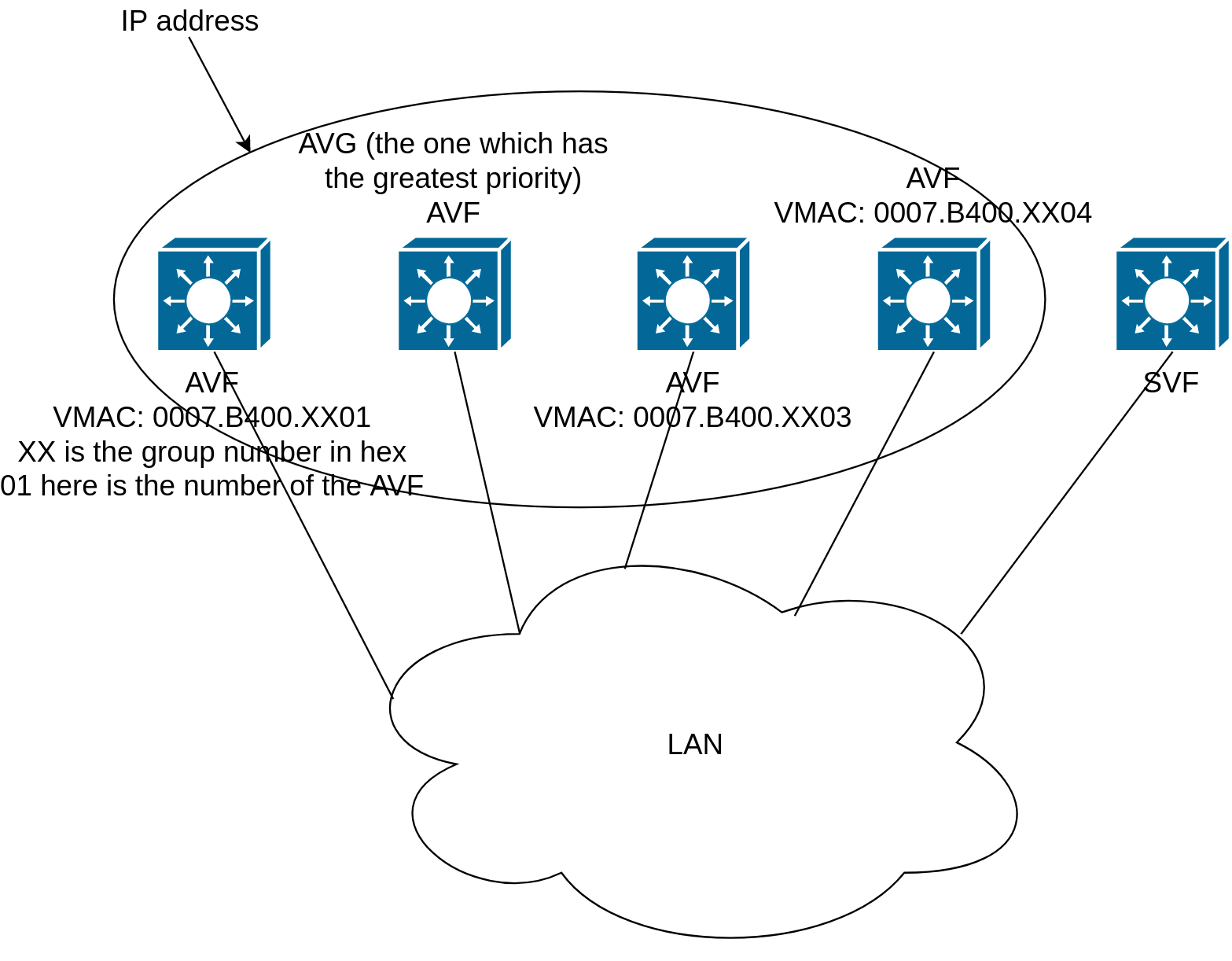
- We can have load balancing as described below
- We have one Active Virtual Gateway (AVG)
- AVG gives a virtual MAC address to each (up to 4) Active Virtual Forwarder (AVF)
- Which MAC address it responds with depends on 2 things:
- Load balancing method: for example round-robin
- AVFs that are part of GLBP group
- Which MAC address it responds with depends on 2 things:
- The other routers other than 4 AVFs become Standby Virtual Forwarder (SVF)
- AVG listens for ARP request for the virtual IP address
- Each AVF owns one virtual MAC address
- AVFs are responsible for routing data traffic to its destination subnet
- Responds with the virtual MAC address of a router in the group
- Preemption for AVG is disabled by default
- Preemption for AVFs is enabled by default so if one AVF fails, AVG gives the MAC address of the failed AVF to another AVF (in this case this AVF responds to 2 MAC addresses up to 18 hours (default is 4 hours))
- Hellos and interval timers are like in HSRP
- Hellos are sent to multicast 224.0.0.102 UDP 3222
Configuration
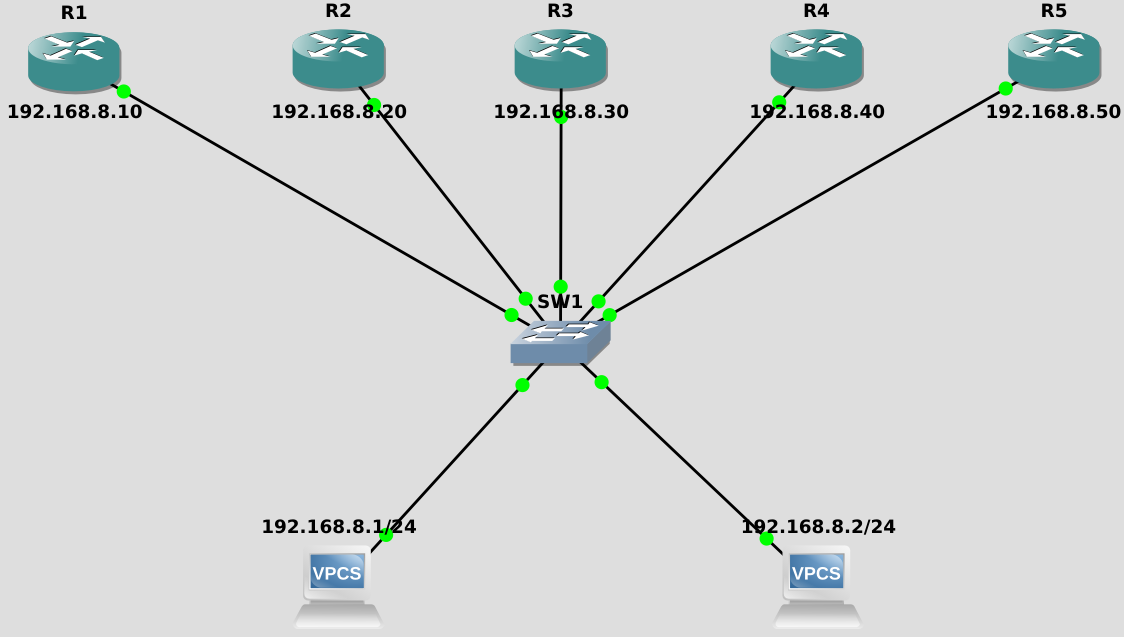
- Catalyst 3750 and 3560 did not support GLBP. I will implement it with routers instead
- For the 192.168.8.0/24 subnet, configure GLBP group 8 on the gig0/0 interfaces
- Hosts in the subnet have 192.168.8.254 as their default gateway
R1(config)#interface gigabitEthernet 0/0
R1(config-if)#glbp 8 ip 192.168.8.254
R1#show glbp
GigabitEthernet0/0 - Group 8
  State is Active
    1 state change, last state change 00:01:17
  Virtual IP address is 192.168.8.254
  Hello time 3 sec, hold time 10 sec
    Next hello sent in 1.856 secs
  Redirect time 600 sec, forwarder timeout 14400 sec
  Preemption disabled
  Active is local
  Standby is 192.168.8.50, priority 100 (expires in 7.424 sec)
  Priority 100 (default)
  Weighting 100 (default 100), thresholds: lower 1, upper 100
  Load balancing: round-robin
  Group members:
    0075.645c.5500 (192.168.8.20)
    0075.646e.3200 (192.168.8.10) local
    0075.6484.9100 (192.168.8.50)
    0075.64c6.de00 (192.168.8.30)
    0075.64f3.5b00 (192.168.8.40)
  There are 4 forwarders (1 active)
  Forwarder 1
    State is Active
      1 state change, last state change 00:00:36
    MAC address is 0007.b400.0801 (default)
    Owner ID is 0075.646e.3200
    Redirection enabled
    Preemption enabled, min delay 30 sec
    Active is local, weighting 100
  Forwarder 2
    State is Listen
    MAC address is 0007.b400.0802 (learned)
    Owner ID is 0075.64c6.de00
    Redirection enabled, 598.592 sec remaining (maximum 600 sec)
    Time to live: 14398.592 sec (maximum 14400 sec)
    Preemption enabled, min delay 30 sec
    Active is 192.168.8.30 (primary), weighting 100 (expires in 9.760 sec)
  Forwarder 3
    State is Listen
    MAC address is 0007.b400.0803  (learned)
    Owner ID is 0075.645c.5500
    Redirection enabled, 599.904 sec remaining (maximum 600 sec)
    Time to live: 14399.904 sec (maximum 14400 sec)
    Preemption enabled, min delay 30 sec
    Active is 192.168.8.20 (primary), weighting 100 (expires in 10.240 sec)
  Forwarder 4
    State is Listen
    MAC address is 0007.b400.0804  (learned)
    Owner ID is 0075.64f3.5b00
    Redirection enabled, 599.904 sec remaining (maximum 600 sec)
    Time to live: 14399.904 sec (maximum 14400 sec)
    Preemption enabled, min delay 30 sec
    Active is 192.168.8.40 (primary), weighting 100 (expires in 10.240 sec)
Interface   Grp  Fwd Pri State    Address         Active router   Standby router
Gi0/0       8    -   100 Active   192.168.8.254   local           192.168.8.50
Gi0/0       8    1   -   Active   0007.b400.0801  local           -
Gi0/0       8    2   -   Listen   0007.b400.0802  192.168.8.30    -
Gi0/0       8    3   -   Listen   0007.b400.0803  192.168.8.20    -
Gi0/0       8    4   -   Listen   0007.b400.0804  192.168.8.40    -
Let us see the first 2 lines of the
show glbp output of R2 (AVF) and R5 (SVF)
R2#show glbp
GigabitEthernet0/0 - Group 8
  State is Listen
R5#show glbp
GigabitEthernet0/0 - Group 8
  State is Standby
Let us see which MAC address is in the ARP cache of PC1
PC1> ping 192.168.8.254
84 bytes from 192.168.8.254 icmp_seq=1 ttl=255 time=3.975 ms

PC1> arp
00:07:b4:00:08:02  192.168.8.254 expires in 114 seconds
Now see the output of PC2:
PC2> ping 192.168.8.254
84 bytes from 192.168.8.254 icmp_seq=1 ttl=255 time=2.998 ms

PC2> arp
00:07:b4:00:08:03  192.168.8.254 expires in 114 seconds
Weighting
We only need to change the load balancing method in the AVG.R1(config-if)#glbp 8 load-balancing ? host-dependent Load balance equally, source MAC determines forwarder choice round-robin Load balance equally using each forwarder in turn weighted Load balance in proportion to forwarder weighting
Requirements for lab:
- Configure only the current AVG to load balance traffic as follows:
- R1: 15%
- R2: 20%
- R3: 25%
- R4: 40%
R1(config)#interface gigabitEthernet 0/0
R1(config-if)#glbp 8 load-balancing weighted
R1(config-if)#glbp 8 weighting 15
R2(config)#interface gigabitEthernet 0/0
R2(config-if)#glbp 8 weighting 20
R3(config)#interface gigabitEthernet 0/0
R3(config-if)#glbp 8 weighting 25
R4(config)#interface gigabitEthernet 0/0
R4(config-if)#glbp 8 weighting 40