Switched Port Analyzer (SPAN)
When host A sends traffic to host B, but we want to receive a copy on host C (sniffer: Wireshark, IPS, IDS), we take advantage of Switched Port Analyzer (SPAN)
No need for the sniffer to have an IP address
Types of SPAN
Local SPAN
- We can monitor ingress traffic
- We can monitor egress traffic
- We can monitor both ingress and egress traffic (the default value)
- Catalyst 2900XL and 3500XL do not support Tx-only or Rx-only direction
- Monitor port is a destination SPAN port:
- It does NOT participate in any of the Layer 2 protocols (STP, VTP, CDP, DTP, PAgP). So if you see STP traffic on your sniffer, it belongs to the source interface.
- The state of the port is up/down by design.
- A destination port can participate in only one SPAN session at a time
To sniff interfaces on the same switch (source and destination ports are on the same switch)
Switch1(config)# monitor session 1 source interface fastEthernet0/2 rx
Switch1(config)# monitor session 1 source interface fastEthernet0/3 tx
Switch1(config)# monitor session 1 source interface fastEthernet0/4

Switch1(config)# monitor session 1 destination interface fastEthernet0/24- If source ports are not access ports we have to use
encapsulation replicatekeyword at the end of destination command. Then destination interface will become trunk as the source interface is.
Switch1(config)# monitor session 1 source interface fastEthernet0/2
Switch1(config)# monitor session 1 destination interface fastEthernet0/24 replicate
VLAN-Based Span (VSPAN)
To sniff VLANs on the same switch
For VSPAN sessions with both ingress and egress configured, two packets are forwarded to the destination port if the packets get switched on the same VLAN (one as ingress traffic from the ingress port and one as egress traffic from the egress port). In such scenarios, it is possible to see duplicate copies of a packet at the destination port. Hence, for a VSPAN session we specify rx and tx on the source to prevent the duplication.
- If a destination port belongs to a source VLAN, it is excluded from the source list and is not monitored.
- All active ports in the source VLAN are included as source ports and can be monitored in either or both directions.
Cat4K(config)# monitor session 1 source vlan 10 rx
Cat4K(config)# monitor session 1 source vlan 20 tx
Cat4K(config)# monitor session 1 destination interface f3/4
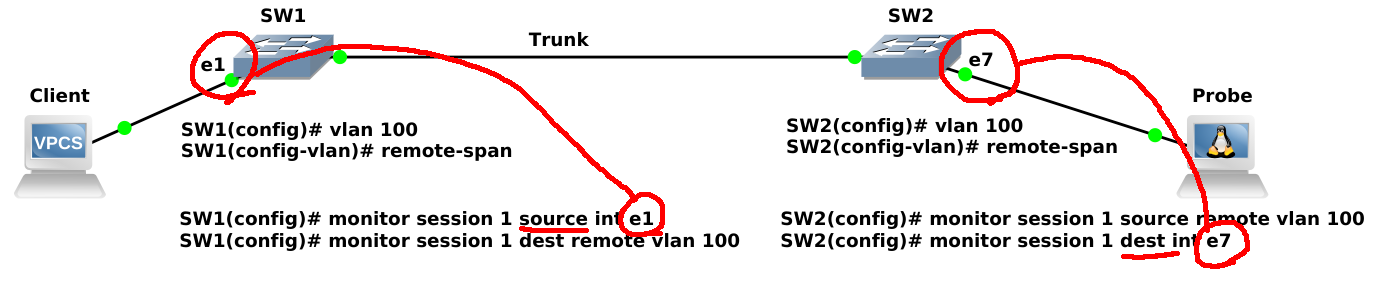
Remote SPAN (RSPAN)
To sniff the ports or VLANs on a different switch than the one that the sniffer is on. In order to configure RSPAN you need to have an RSPAN VLAN, those VLANs have special properties and cannot be assigned to any access ports. We have to define this VLAN on all of the intermediate switches as well to pass the traffic.
The RSPAN VLAN should be allowed in ALL trunks between the involved switches (Source and Destination switches in this case); if you have enabled “pruning” in your network, remove the RSPAN VLAN from the pruning, with the command: switchport trunk pruning vlan remove <RSPAN VLAN ID> under the interface configured as trunk.
Example
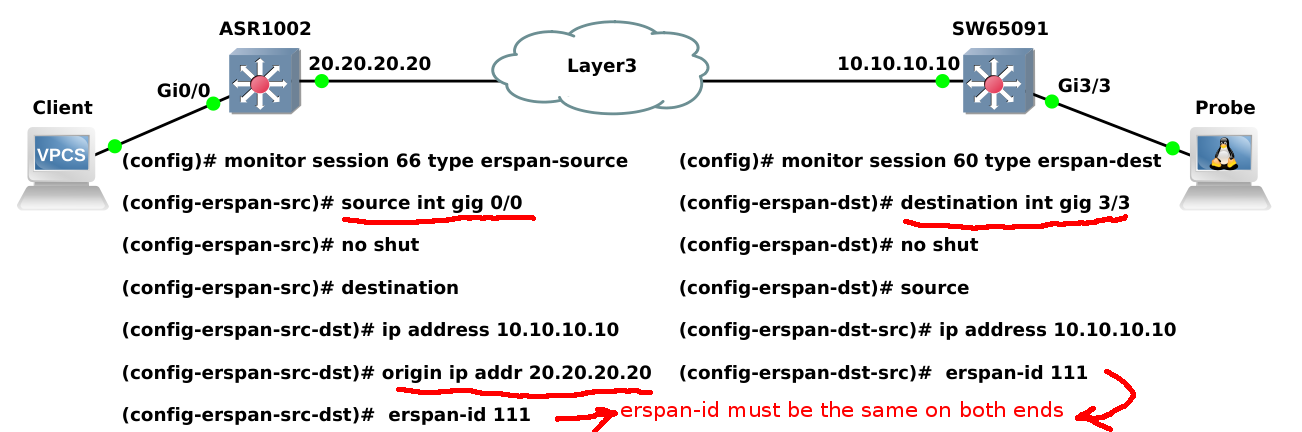
Encapsulated remote SPAN (ERSPAN)
It brings GRE tunneling for all captured traffic and allows it to be extended across Layer 3. ERSPAN is a Cisco proprietary feature and is available only to Catalyst 6500, 7600, Nexus, and ASR 1000 platforms to date. The ASR 1000 supports ERSPAN source (monitoring) only on Fast Ethernet, Gigabit Ethernet, and port-channel interfaces.
Example
Sample Verification
SW1#show interfaces fastEthernet 1/0/24 status

Port      Name               Status       Vlan       Duplex  Speed Type
Fa1/0/24                     monitoring   1          a-half  a-100 10/100BaseTX
SW1#show monitor session 1
Session 1
---------
Type : Local Session
Source Ports :
Both : Fa1/0/12
Destination Ports : Fa1/0/24
Encapsulation : Replicate
Ingress : Disabled