vPC Configuration
ccie-data-center
Building a vPC domain step by step, covering peer keepalive, the peer link, consistency checking, and the member port-channels.
In this topic, we are going to proceed with basic vPC configuration on NX-OS. Let us review what we would need upfront before the configuration.
- We would need L3 connectivity for Peer Keepalive.
- For example, the management interface.
- We would require to enable vPC and LACP features.
- LACP must be used on all member interfaces as well as on the vPC peer-link.
- Then, create vPC domain.
- vPC switches use this ID to identify their peers.
- STP sees the vPC domain as a single switch.
- Configure peer-keepalive under vPC domain.
- Configure Port-Channel on vPC peer-link.
- Verify the consistency parameters.
!1. This configuration assumes you already have L3 connectivity over mgmt0
!2. Enable LACP and vPC features
N9K01(config)# feature lacp
N9K01(config)# feature vpc

!3. Create vPC domain
N9K01(config)# vpc domain 1

!4. Configure peer-keepalive under vPC domain
N9K01(config-vpc-domain)# peer-keepalive destination 10.1.1.2 source 10.1.1.1 vrf management

!5. Configure Port-Channel on vPC peer-link
N9K01(config)# interface ethernet 1/1-2
N9K01(config-if-range)# switchport
N9K01(config-if-range)# switchport mode trunk
N9K01(config-if-range)# channel-group 1 mode active
N9K01(config-if-range)# no shutdown
N9K01(config-if-range)# interface port-channel 1
N9K01(config-if)# switchport
N9K01(config-if)# switchport mode trunk
N9K01(config-if)# vpc peer-link
vPC duplicate frame mechanism rule says, frame coming from vPC member port and going to the vPC peer switch through vPC peer link, cannot exit from a vPC member port on the peer switch.
vPC configuration Workshop
Next, we are going to multihome two servers to two different Nexus switches; then we will configure vPC on the Nexus as well as LACP NIC teaming on the servers:
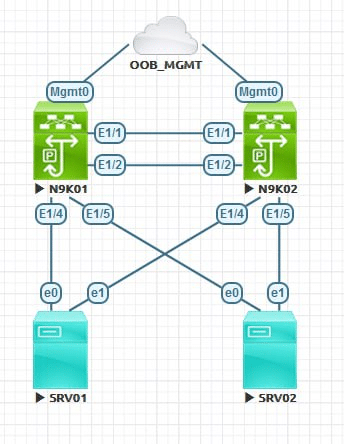
vPC configuration
NX-OS01
feature lacp
feature vpc
vpc domain 1
interface ethernet 1/1-2
switchport
  switchport mode trunk
channel-group 1 mode active
  no  shutdown
interface port-channel 1
switchport
  switchport mode trunk
  vpc peer-link
interface mgmt 0
  no shutdown
  ip address 10.1.1.1/24
vpc domain 1
  peer-keepalive destination 10.1.1.2 source 10.1.1.1 vrf management
exit
interface ethernet 1/4
switchport
  no shutdown
channel-group 4 mode active
interface port-channel 4
switchport
  no shutdown
  vpc
interface ethernet 1/5
 switchport
 no shutdown
channel-group 5 mode active
interface port-channel 5
 switchport
 no shutdown
 vpc
NX-OS01
feature lacp
feature vpc
vpc domain 1
interface ethernet 1/1-2
switchport
  switchport mode trunk
channel-group 1 mode active
  no  shutdown
interface port-channel 1
switchport
  switchport mode trunk
  vpc peer-link
interface mgmt 0
  no shutdown
  ip address 10.1.1.2/24
vpc domain 1
  peer-keepalive destination 10.1.1.1 source 10.1.1.2 vrf management
exit
interface ethernet 1/4
 switchport
 no shutdown
channel-group 4 mode active
interface port-channel 4
 switchport
 no shutdown
 vpc
interface ethernet 1/5
 switchport
 no shutdown
channel-group 5 mode active
interface port-channel 5
 switchport
 no shutdown
 vpc
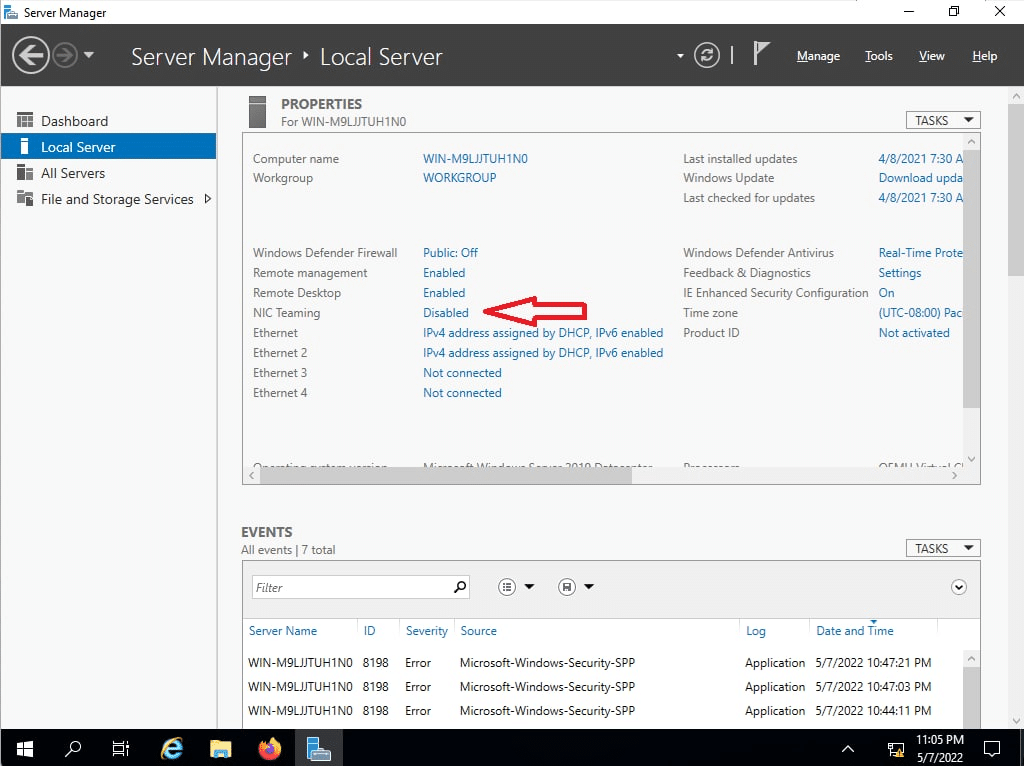
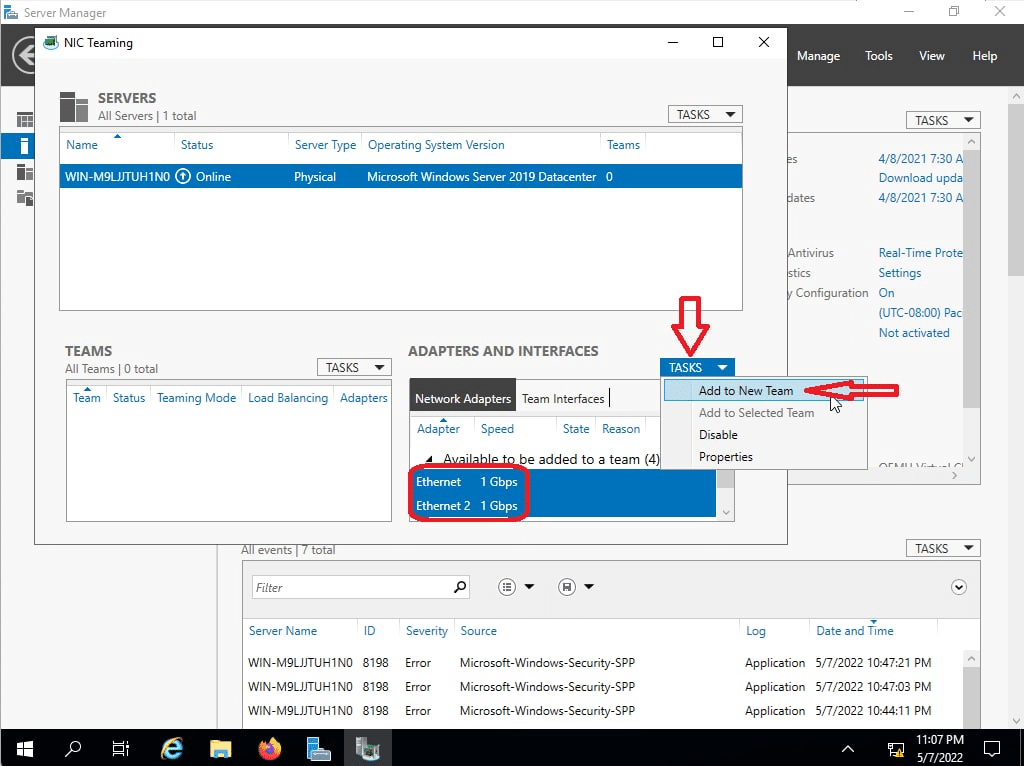
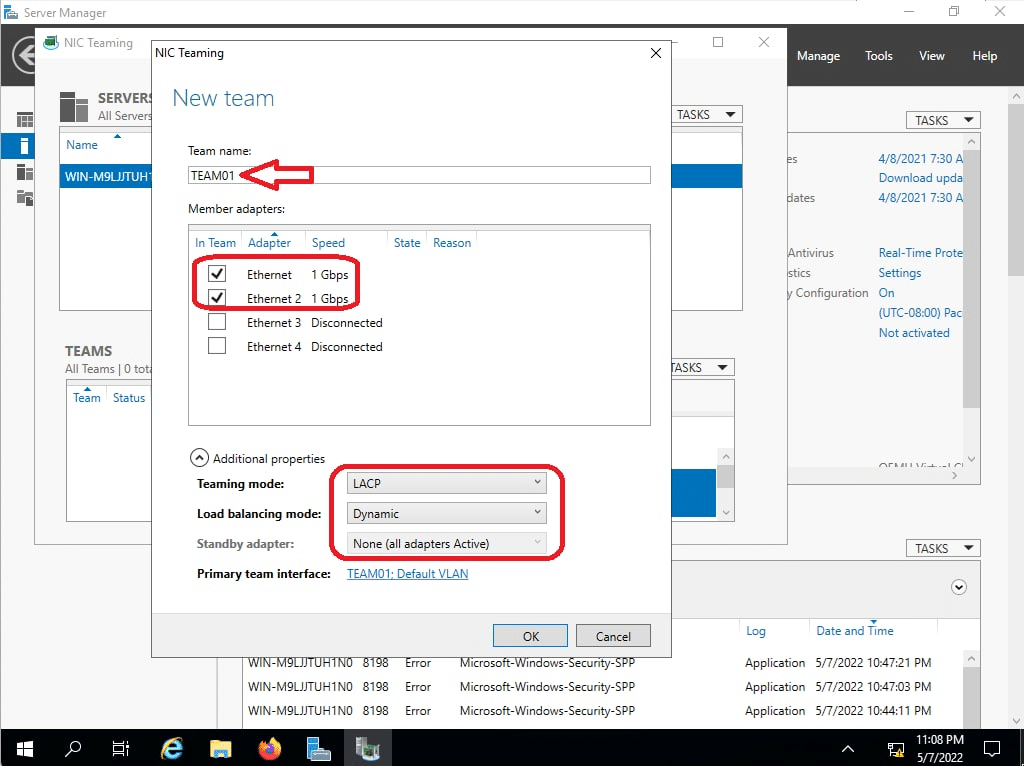
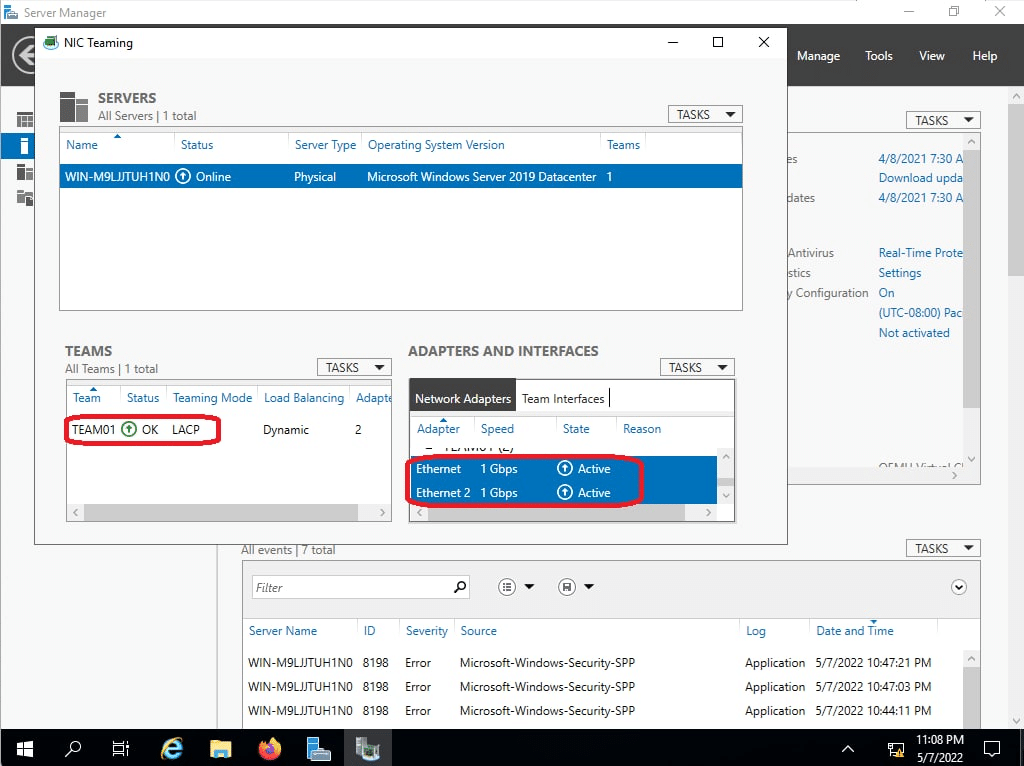
vPC Verification
In this section I am going to describe some important switch knife troubleshooting commands with vPC. I will be explaining the output of these verification commands in the next post.
N9K01# show vpc
Legend:
                (*) - local vPC is down, forwarding via vPC peer-link

vPC domain id                     : 1
Peer status                       : peer adjacency formed ok
vPC keep-alive status             : peer is alive
Configuration consistency status  : success
Per-vlan consistency status       : success
Type-2 consistency status         : success
vPC role                          : primary
Number of vPCs configured         : 2
Peer Gateway                      : Disabled
Dual-active excluded VLANs        : -
Graceful Consistency Check        : Enabled
Auto-recovery status              : Disabled
Delay-restore status              : Timer is off.(timeout = 30s)
Delay-restore SVI status          : Timer is off.(timeout = 10s)
Delay-restore Orphan-port status  : Timer is off.(timeout = 0s)
Operational Layer3 Peer-router    : Disabled
Virtual-peerlink mode             : Disabled

vPC Peer-link status
---------------------------------------------------------------------
id    Port   Status Active vlans
--    ----   ------ -------------------------------------------------
1     Po1    up     1


vPC status
----------------------------------------------------------------------------
Id    Port          Status Consistency Reason                Active vlans
--    ------------  ------ ----------- ------                ---------------
4     Po4           up     success     success               1


5     Po5           up     success     success               1


Please check "show vpc consistency-parameters vpc <vpc-num>" for the
consistency reason of down vpc and for type-2 consistency reasons for
any vpc.


N9K01# show vpc consistency-parameters global

    Legend:
        Type 1 : vPC will be suspended in case of mismatch

Name                        Type  Local Value            Peer Value
-------------               ----  ---------------------- -----------------------
STP MST Simulate PVST       1     Enabled                Enabled
STP Port Type, Edge         1     Normal, Disabled,      Normal, Disabled,
BPDUFilter, Edge BPDUGuard        Disabled               Disabled
STP MST Region Name         1     ""                     ""
STP Disabled                1     None                   None
STP Mode                    1     Rapid-PVST             Rapid-PVST
STP Bridge Assurance        1     Enabled                Enabled
STP Loopguard               1     Disabled               Disabled
STP MST Region Instance to  1
 VLAN Mapping
STP MST Region Revision     1     0                      0
Xconnect Vlans              1
QoS (Cos)                   2     ([0-7], [], [], [],    ([0-7], [], [], [],
                                  [], [], [], [])        [], [], [], [])
Network QoS (MTU)           2     (1500, 1500, 1500,     (1500, 1500, 1500,
                                  1500, 0, 0, 0, 0)      1500, 0, 0, 0, 0)
Network Qos (Pause:         2     (F, F, F, F, F, F, F,  (F, F, F, F, F, F, F,
T->Enabled, F->Disabled)          F)                     F)
Input Queuing (Bandwidth)   2     (0, 0, 0, 0, 0, 0, 0,  (0, 0, 0, 0, 0, 0, 0,
                                  0)                     0)
Input Queuing (Absolute     2     (F, F, F, F, F, F, F,  (F, F, F, F, F, F, F,
Priority: T->Enabled,             F)                     F)
F->Disabled)
Output Queuing (Bandwidth   2     (100, 0, 0, 0, 0, 0,   (100, 0, 0, 0, 0, 0,
Remaining)                        0, 0)                  0, 0)
Output Queuing (Absolute    2     (F, F, F, T, F, F, F,  (F, F, F, T, F, F, F,
Priority: T->Enabled,             F)                     F)
F->Disabled)
Allowed VLANs               -     1                      1
Local suspended VLANs       -     -                      -