Multiple Spanning Tree Protocol (IEEE 802.1s)
Brief Introduction to MST
IEEE 802.1s originally started as Cisco’s Multiple Instances Spanning Tree Protocol (MISTP). Remember that RapidPVST+ each VLAN is mapped to a single spanning tree instance. When you have 200 VLANs, it means there are 200 instances of spanning tree. This requires a lot of CPU power and memory. You can put multiple VLANs together in something called an instance. The end result is that you would have fewer instances of spanning-tree which results in a higher scalability. MST (802.1s) relies on RSTP (802.1W).
How IEEE 802.1s (MST) Works
In order to improve the convergence time of STP (or CST), IEEE released IEEE 802.1w standard. With this
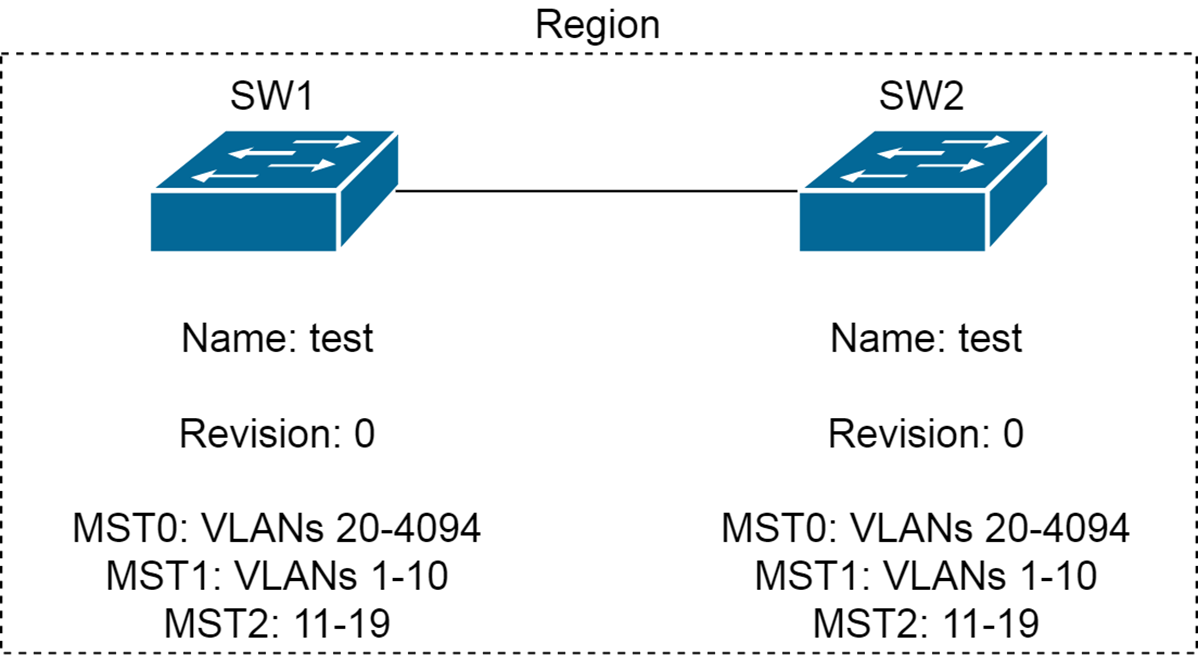
With MST, the topology calculation is done by RSTP. MST works by decoupling VLANs and STP Instances. The network administrator will define the VLAN to instance mapping. By default, all VLANs belong to default MST0 (AKA Common Internal Spanning Tree or CIST or IST). When two switches have the same instance-to-VLAN mapping database, the same instance name, and then same instance revision number, we say that they are in the same region.
When two switches are in the same MST region (intra-region), they know the detail of their region as a result MST forms within the region. Undefined VLANs fall into MST0
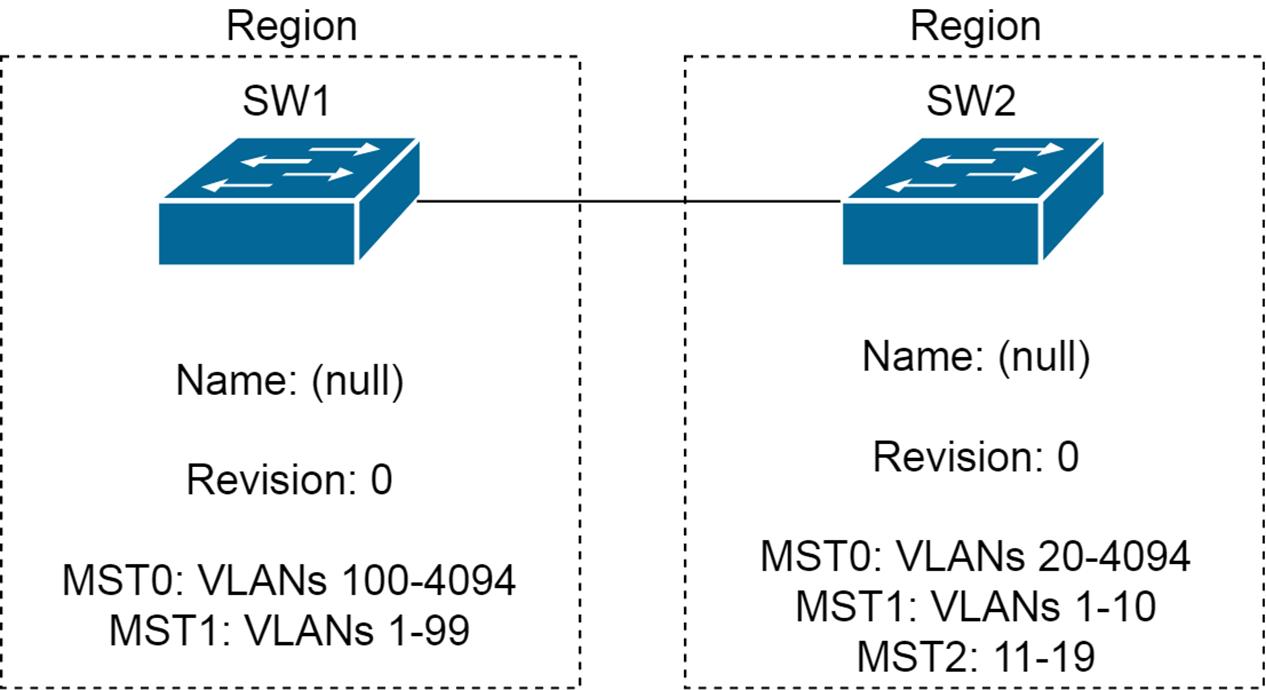
When two switches are in different regions (inter-region), they do not have the details of the other region. The two regions see each other as virtual bridges. The result is that they run RSTP for inter-region calculation. Intra-region MST Instances are collapsed into MST0.
MST and CST Inter-Operation
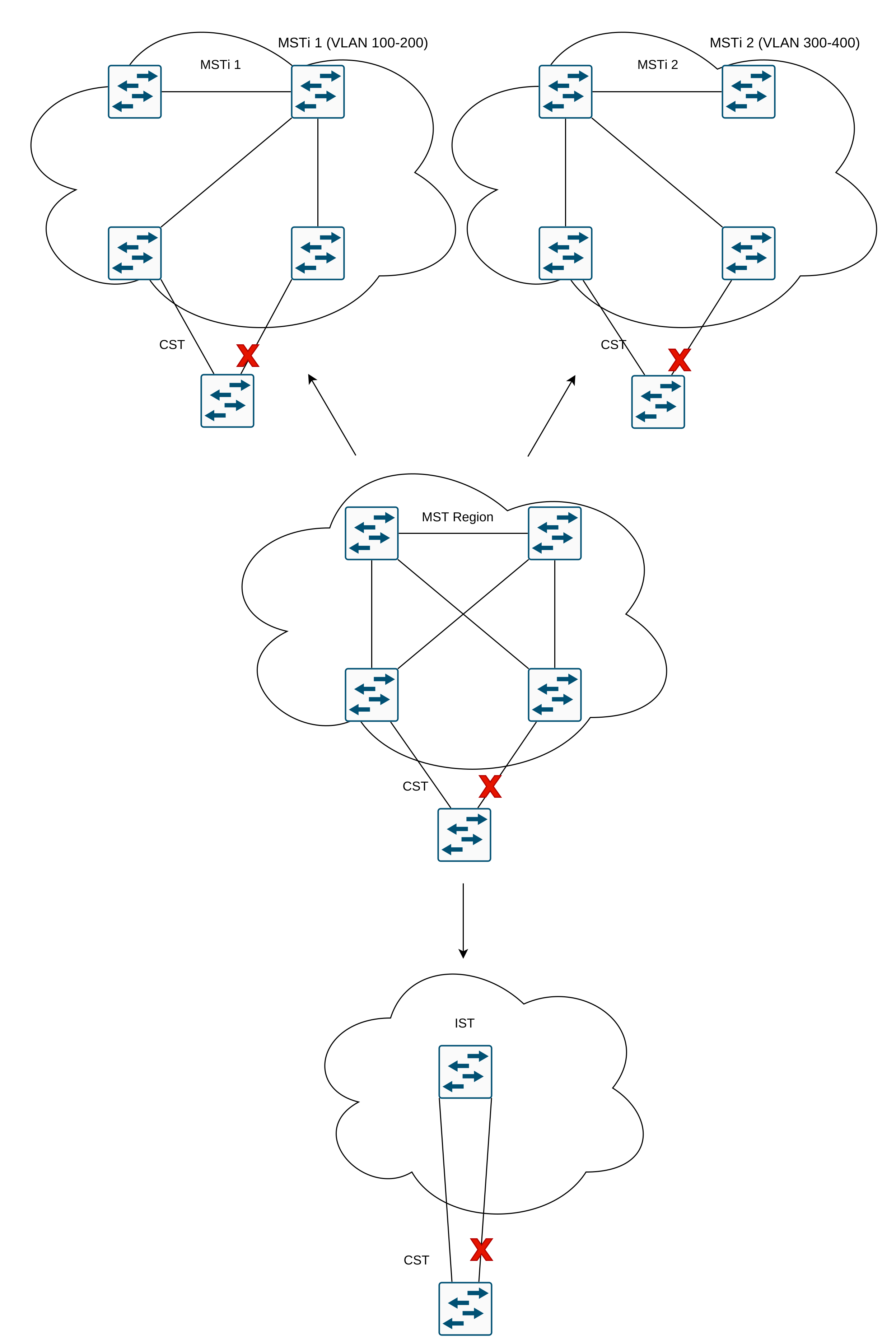
From inside MST you might have different topologies based on which ports are in forwarding mode and which ports are alternate. This is what you see in the middle to top of the image below
From CST point of view, the MST region looks like a single switch. This is what you see in the middle and bottom of the image below
MST Configuration
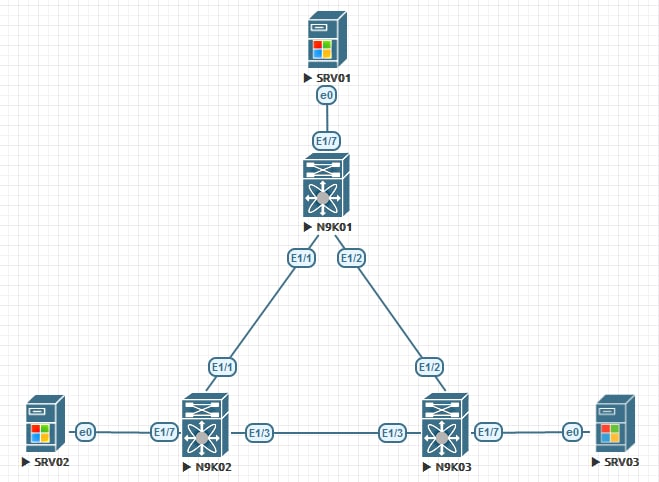
N9K01, N9K02, and N9K03 connect together in a triangle topology:
N9K01(config)# configure terminal
N9K01(config)# spanning-tree mst configuration
N9K01(config-mst)# ! Upon issuing the commands below, it does not have any
N9K01(config-mst)# !configuration change or any impact on the production.
N9K01(config-mst)# !unless you exit from this configuration subcommands.
N9K01(config-mst)# name SMENODE-DC01
N9K01(config-mst)# revision 1
N9K01(config-mst)# instance 1 vlan 100,200
N9K01(config-mst)# instance 2 vlan 300,400
N9K01(config-mst)# ! Make sure you review the configuration then exit to save the
N9K01(config-mst)# !configuration. The production won't be impacted if you
N9K01(config-mst)# !haven't stilled change the spanning-tree mode to MST
N9K01(config-mst)# show

Pending MST Configuration
Name      [SMENODE-DC01]
Revision  1     Instances configured 3
Instance  Vlans mapped
--------  ---------------------------------------------------------------------
0         1-99,101-199,201-299,301-399,401-4094
1         100,200
2         300,400

N9K01(config-mst)# ! Note that if you don't map a VLAN to an instance, it goes
N9K01(config-mst)# !under IST
N9K01(config-mst)# exit
N9K01(config)# spanning-tree mode mst
Verification
Let us check if the configuration on all switches are the same. I am going to show you the configuration on N9K01 and N9K03.
N9K01(config)# show spanning-tree mst configuration digest
Name      [SMENODE-DC01]
Revision  1     Instances configured 1
Digest          0x8b5d98ca042bad0d7fa5f18744f4755d
Pre-std Digest  0x73a6b19dfef58d4d5957bd6ff44a4515
N9K03(config)# show spanning-tree mst configuration digest
Name      [SMENODE-DC01]
Revision  1     Instances configured 1
Digest          0x8b5d98ca042bad0d7fa5f18744f4755d
Pre-std Digest  0x73a6b19dfef58d4d5957bd6ff44a4515
As you can see the MST digest for both switches are identical. Hence, we can say that they are in the same region. Now, let us verify the topology:
N9K01# show spanning-tree

MST0000

  Spanning tree enabled protocol mstp
  Root ID    Priority    32768
             Address     5001.0000.1b08
             This bridge is the root
             Hello Time  2  sec  Max Age 20 sec  Forward Delay 15 sec

  Bridge ID  Priority    32768  (priority 32768 sys-id-ext 0)
             Address     5001.0000.1b08
             Hello Time  2  sec  Max Age 20 sec  Forward Delay 15 sec

Interface        Role Sts Cost      Prio.Nbr Type
---------------- ---- --- --------- -------- --------------------------------
Eth1/1           Desg FWD 20000     128.1    P2p
Eth1/2           Desg FWD 20000     128.2    P2p
Eth1/3           Desg FWD 20000     128.3    P2p
Eth1/4           Desg FWD 20000     128.4    P2p
Eth1/5           Desg FWD 20000     128.5    P2p


MST0001

  Spanning tree enabled protocol mstp
  Root ID    Priority    32769
             Address     5001.0000.1b08
             This bridge is the root
             Hello Time  2  sec  Max Age 20 sec  Forward Delay 15 sec

  Bridge ID  Priority    32769  (priority 32768 sys-id-ext 1)
             Address     5001.0000.1b08
             Hello Time  2  sec  Max Age 20 sec  Forward Delay 15 sec

Interface        Role Sts Cost      Prio.Nbr Type
---------------- ---- --- --------- -------- --------------------------------
Eth1/1           Desg FWD 20000     128.1    P2p
Eth1/2           Desg FWD 20000     128.2    P2p
Eth1/3           Desg FWD 20000     128.3    P2p


MST0002
  Spanning tree enabled protocol mstp
  Root ID    Priority    32770
             Address     5001.0000.1b08
             This bridge is the root
             Hello Time  2  sec  Max Age 20 sec  Forward Delay 15 sec

  Bridge ID  Priority    32770  (priority 32768 sys-id-ext 2)
             Address     5001.0000.1b08
             Hello Time  2  sec  Max Age 20 sec  Forward Delay 15 sec

Interface        Role Sts Cost      Prio.Nbr Type
---------------- ---- --- --------- -------- --------------------------------
Eth1/1           Desg FWD 20000     128.1    P2p
Eth1/2           Desg FWD 20000     128.2    P2p
Eth1/3           Desg FWD 20000     128.3    P2p