vPC Initialization and Failure Scenarios
ccie-data-center
How a vPC pair comes up and synchronizes with CFSoE, then what happens when the peer link, the keepalive, or a whole switch fails.
In this section, let us see vPC initialization process; then we will discuss on different failure scenarios:
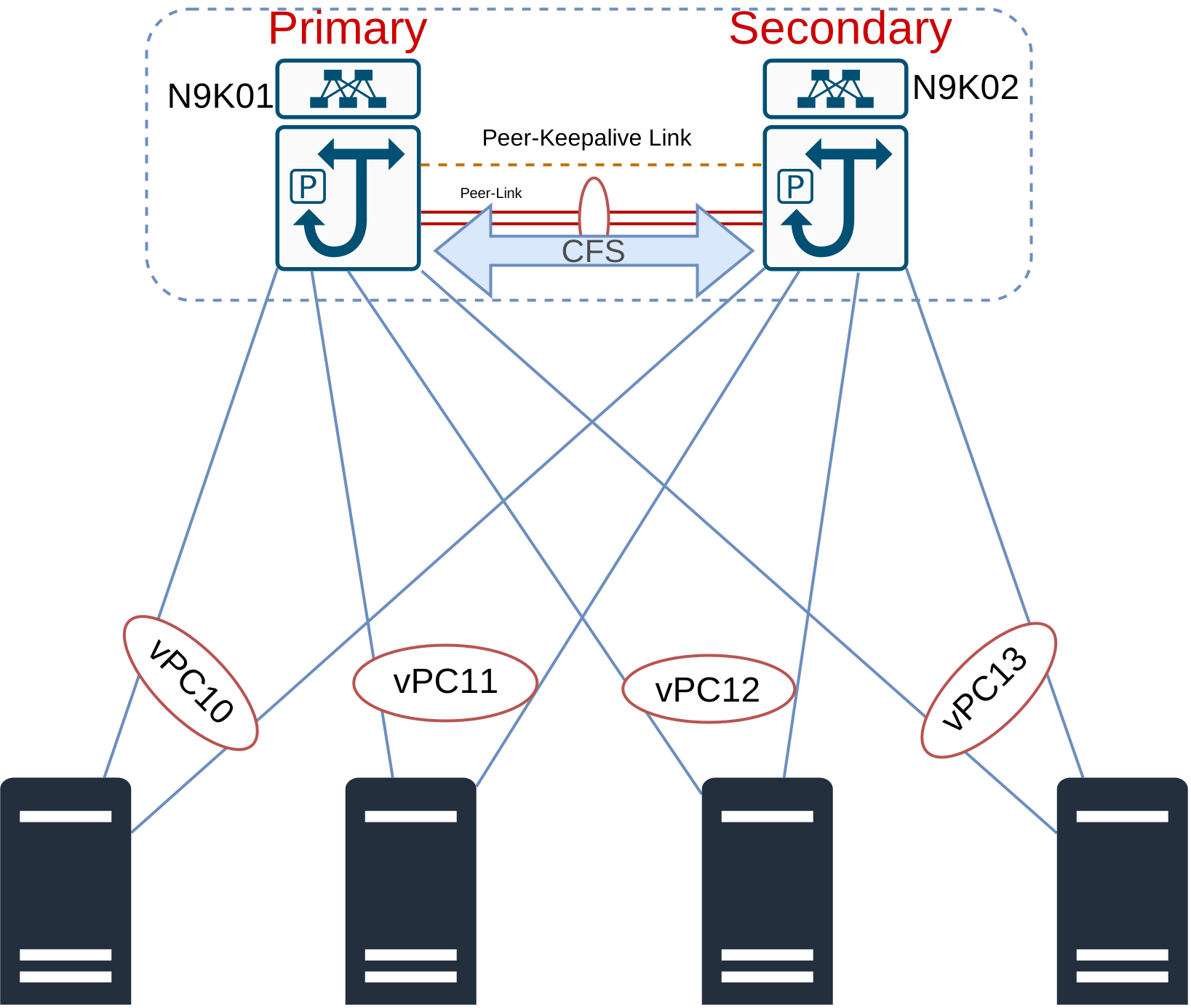
- The minute you enable vPC feature, the switch sends UDP 3200 ping keepalive to establish connectivity with its peer. Once the connectivity established, the switch in turn enables CFSoE to synchronize the control plane and to carry PDUs for vPC, STP, and IGMP. (Note that first connectivity must be established by peer keepalive then peer-link adjacency forms).
- The CFS messages then send a copy of local vPC configuration to the peer. Once the peers have the copy of other peer, they check whether there is a consistency parameters match or not.
- Continuing from initialization, then L3 SVIs followed by vPC member ports become up/up.
- So, after a reboot if peer keepalive never comes up, peer-link will not come up which means that member ports never come up. As a result the end hosts isolated. We can configure vPC auto recovery so that if peer-link does not come up before auto recovery timeout, the vPC peer promotes itself as primary and bring up the member ports.
- Primary switch synchronizes the STP state on the secondary peer with the CFS message. Cisco recommends that you configure the vPC primary as STP root primary and vPC secondary as STP root secondary switch.
Note that CFS is Cisco feature that distributes data, including configuration changes between Cisco devices in your network. CFS comes with different types (CFSoE, CFSoIP, CFSoFC), but for vPC when I use CFS, I mean CFSoE (CFS over Ethernet).
N9K01(config)# show cfs status
Distribution : Enabled
Distribution over IP : Disabled
IPv4 multicast address : 239.255.70.83
IPv6 multicast address : ff15::efff:4653
Distribution over Ethernet : Enabled
N9K02(config-if-range)# show vpc
Legend:
                (*) - local vPC is down, forwarding via vPC peer-link

vPC domain id                     : 1
Peer status                       : peer adjacency formed ok
vPC keep-alive status             : peer is alive
Configuration consistency status  : success
Per-vlan consistency status       : success
Type-2 consistency status         : success
vPC role                          : secondary
Number of vPCs configured         : 2
Peer Gateway                      : Disabled
Dual-active excluded VLANs        : -
Graceful Consistency Check        : Enabled
Auto-recovery status              : Disabled
Delay-restore status              : Timer is off.(timeout = 30s)
Delay-restore SVI status          : Timer is off.(timeout = 10s)
Delay-restore Orphan-port status  : Timer is off.(timeout = 0s)
Operational Layer3 Peer-router    : Disabled
Virtual-peerlink mode             : Disabled

vPC Peer-link status
---------------------------------------------------------------------
id    Port   Status Active vlans
--    ----   ------ -------------------------------------------------
1     Po1    up     1,100,200


vPC status
----------------------------------------------------------------------------
Id    Port          Status Consistency Reason                Active vlans
--    ------------  ------ ----------- ------                ---------------
4     Po4           up     success     success               100,200
5     Po5           up     success     success               100,200

Please check "show vpc consistency-parameters vpc <vpc-num>" for the
consistency reason of down vpc and for type-2 consistency reasons for
any vpc.
vPC Types of Consistency Checks
When consistency check parameters do not match the vPC may not form depending on what the does not match. Let us first see what those parameters are: There is three types of consistency parameters:
- Type 1 Global: If there is mismatch here, the vPC does not form.
- Get the list of the Type 1 global consistency parameters by
show vpc consistency-parameters global
- Get the list of the Type 1 global consistency parameters by
- Type 1 Interface: Mismatch here results in VLAN suspension on vPC member.
show vpc consistency-parameters vpc
- Type 2: Mismatch here does not prevent vPC from forming; but rather it generates a syslog message.
show vpc consistency-parameters global
N9K01(config)# show vpc consistency-parameters global

    Legend:
        Type 1 : vPC will be suspended in case of mismatch

Name                        Type  Local Value            Peer Value
-------------               ----  ---------------------- -----------------------
STP MST Simulate PVST       1     Enabled                Enabled
STP Port Type, Edge         1     Normal, Disabled,      Normal, Disabled,
BPDUFilter, Edge BPDUGuard        Disabled               Disabled
STP MST Region Name         1     ""                     ""
STP Disabled                1     None                   None
STP Mode                    1     Rapid-PVST             Rapid-PVST
STP Bridge Assurance        1     Enabled                Enabled
STP Loopguard               1     Disabled               Disabled
STP MST Region Instance to  1
 VLAN Mapping
STP MST Region Revision     1     0                      0
Xconnect Vlans              1
QoS (Cos)                   2     ([0-7], [], [], [],    ([0-7], [], [], [],
                                  [], [], [], [])        [], [], [], [])
Network QoS (MTU)           2     (1500, 1500, 1500,     (1500, 1500, 1500,
                                  1500, 0, 0, 0, 0)      1500, 0, 0, 0, 0)
Network Qos (Pause:         2     (F, F, F, F, F, F, F,  (F, F, F, F, F, F, F,
T->Enabled, F->Disabled)          F)                     F)
Input Queuing (Bandwidth)   2     (0, 0, 0, 0, 0, 0, 0,  (0, 0, 0, 0, 0, 0, 0,
                                  0)                     0)
Input Queuing (Absolute     2     (F, F, F, F, F, F, F,  (F, F, F, F, F, F, F,
Priority: T->Enabled,             F)                     F)
F->Disabled)
Output Queuing (Bandwidth   2     (100, 0, 0, 0, 0, 0,   (100, 0, 0, 0, 0, 0,
Remaining)                        0, 0)                  0, 0)
Output Queuing (Absolute    2     (F, F, F, T, F, F, F,  (F, F, F, T, F, F, F,
Priority: T->Enabled,             F)                     F)
F->Disabled)
Allowed VLANs               -     1,100,200              1,100,200
Local suspended VLANs       -     -                      -

N9K01(config)# show vpc consistency-parameters vpc 4

    Legend:
      Type 1 : vPC will be suspended in case of mismatch for down vpc

Name                        Type  Local Value            Peer Value
-------------               ----  ---------------------- -----------------------
delayed-lacp                1     disabled               disabled
lacp suspend disable        1     enabled                enabled
mode                        1     active                 active
Switchport Isolated         1     0                      0
Interface type              1     port-channel           port-channel
LACP Mode                   1     on                     on
Virtual-ethernet-bridge     1     Disabled               Disabled
Speed                       1     1000 Mb/s              1000 Mb/s
Duplex                      1     full                   full
MTU                         1     1500                   1500
Port Mode                   1     trunk                  trunk
Native Vlan                 1     1                      1
Admin port mode             1     trunk                  trunk
Port-type External          1     Disabled               Disabled
STP Port Guard              1     Default                Default
STP Port Type               1     Default                Default
STP MST Simulate PVST       1     Default                Default
lag-id                      1     [(0, 50-0-0-3-0-1, 0,  [(0, 50-0-0-3-0-1, 0,
                                  0, 0), (7f9b,          0, 0), (7f9b,
                                  0-23-4-ee-be-1, 8004,  0-23-4-ee-be-1, 8004,
                                  0, 0)]                 0, 0)]
Allow-Multi-Tag             1     Disabled               Disabled
Vlan xlt mapping            1     Disabled               Disabled
vPC card type               1     N9K EOR LC             N9K EOR LC
Allowed VLANs               -     100,200                100,200
Local suspended VLANs       -     -                      -
vPC Failure Scenarios
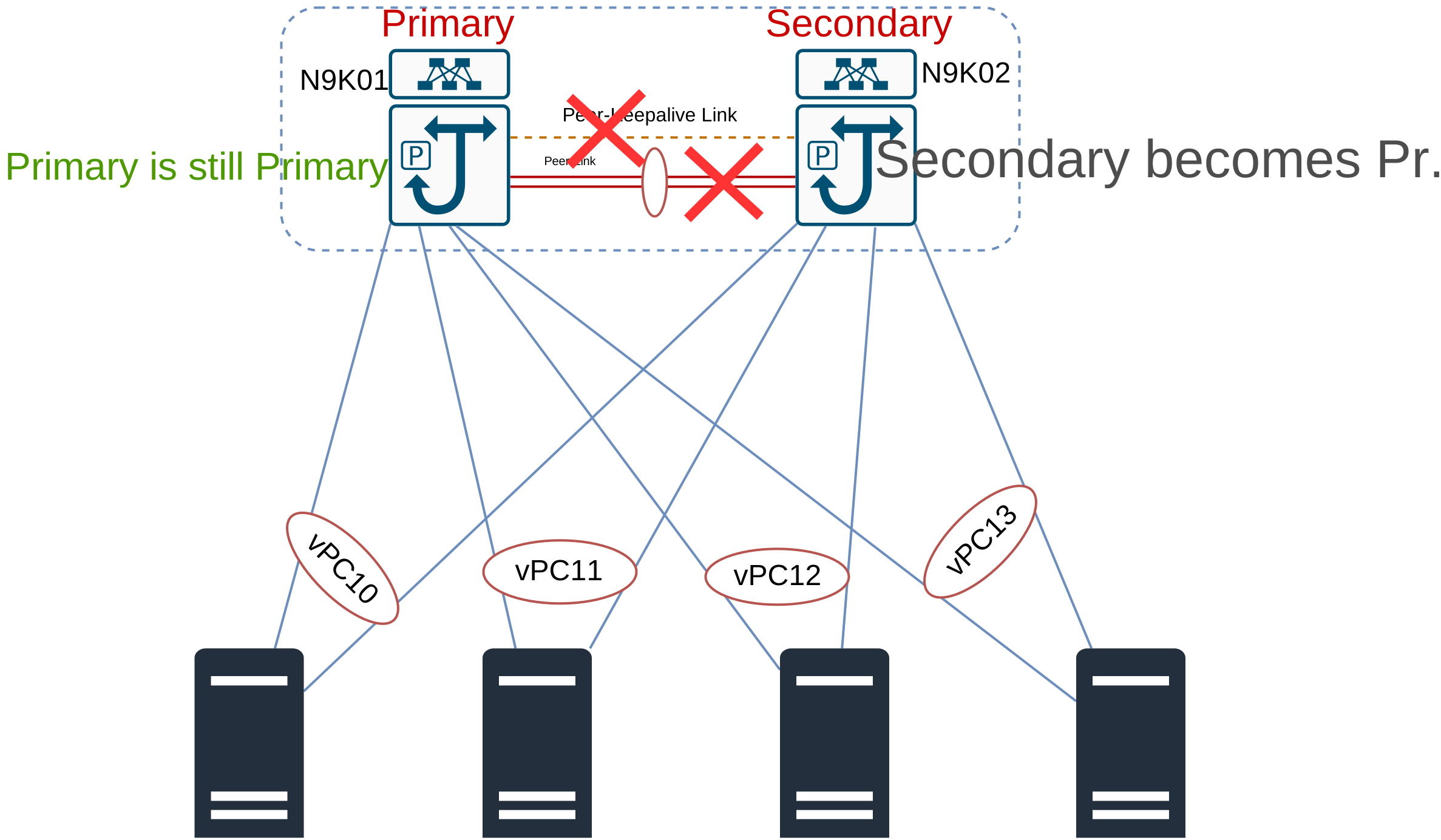
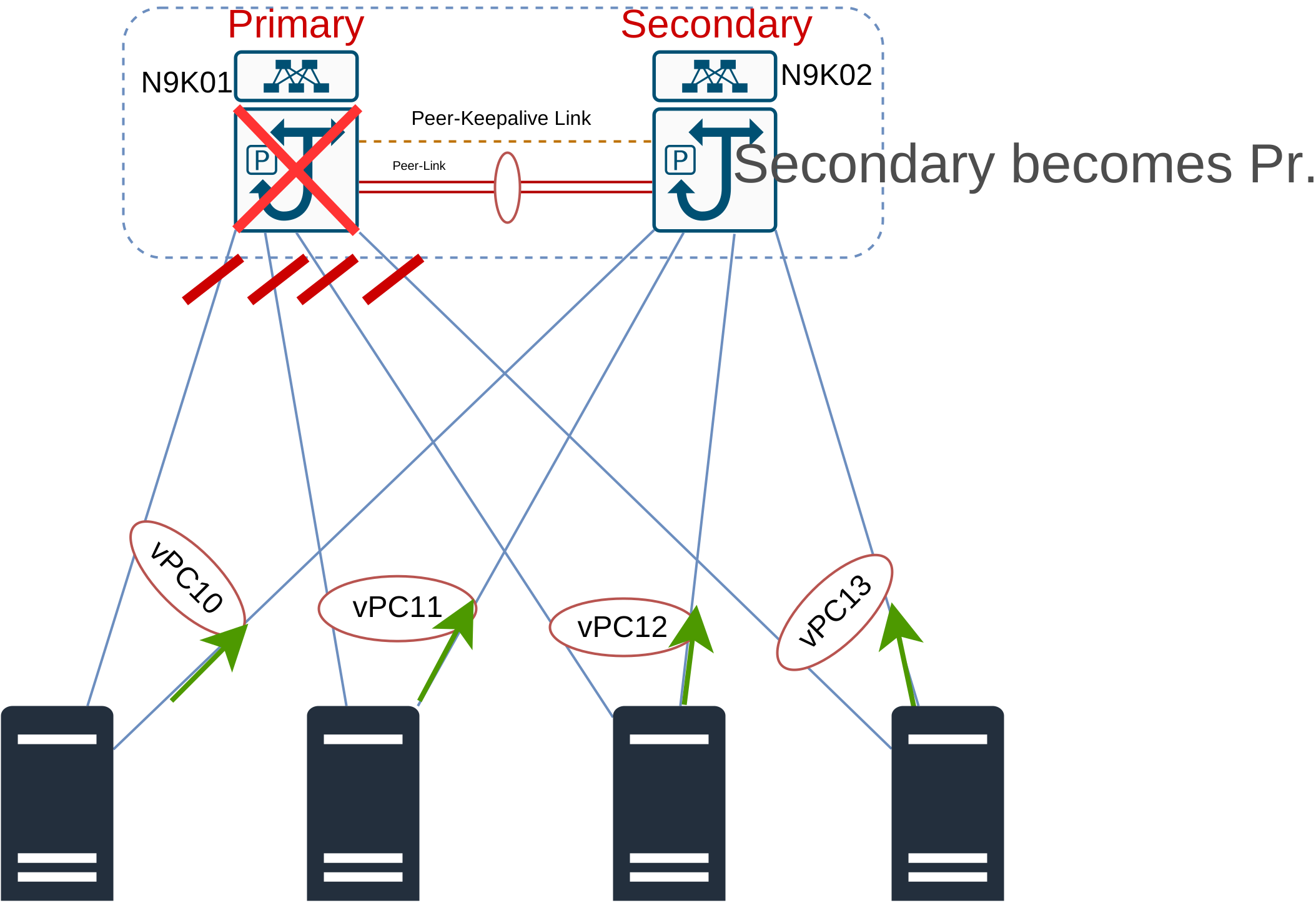
If vPC primary completely fails, the vPC secondary promotes itself as the primary. We will discuss later in the section of peer-link and peer-keepalive failure.
vPC peer keepalive and peer link together prevent different failure scenarios. Let us see how they work together.
vPC Peer Link Failure
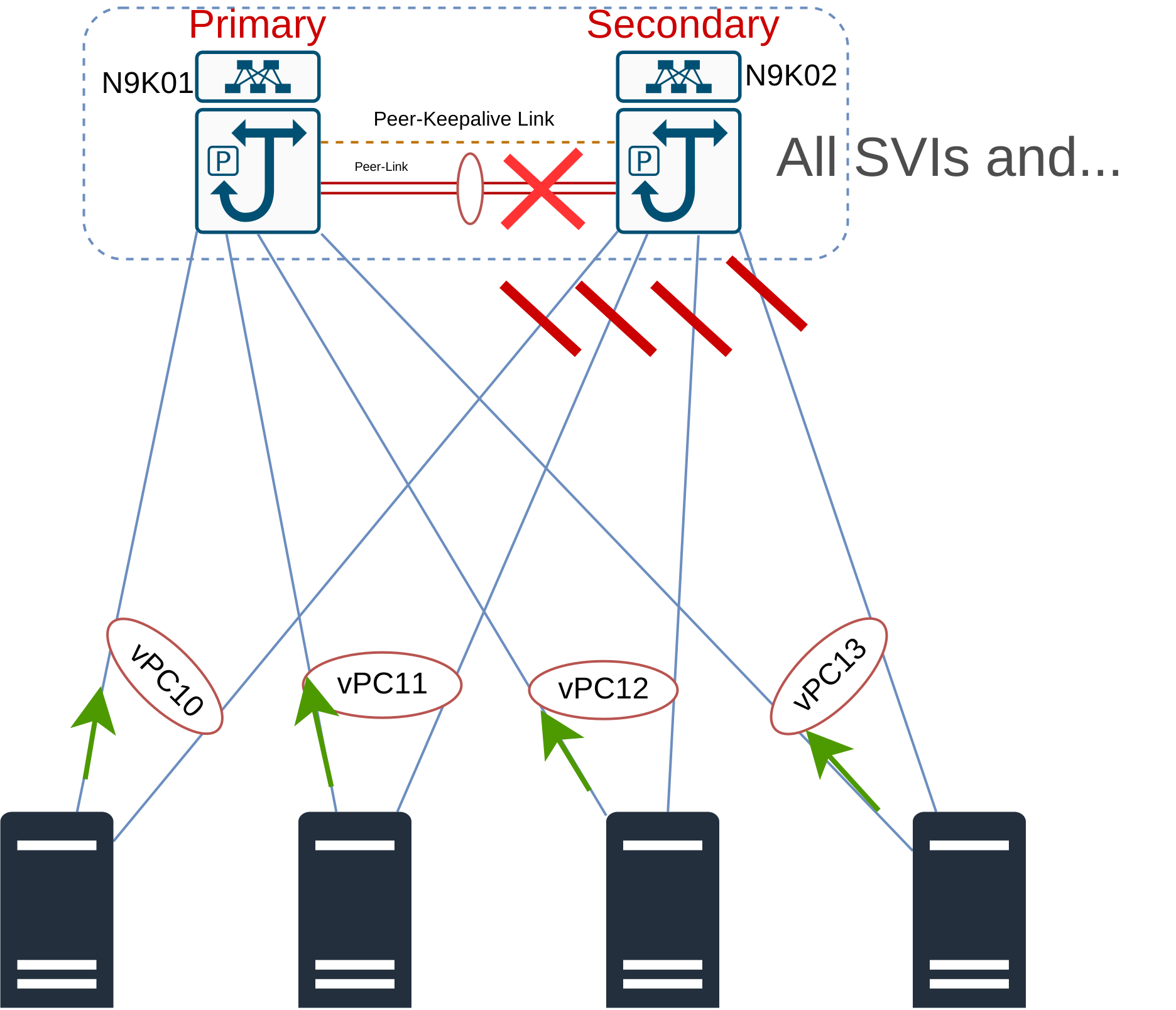
Let us imagine that the vPC peer-link fails, secondary pings the primary (via vPC keepalive), then it notices:
- the vPC primary is dead: Then vPC secondary promotes itself as vPC primary.
- the vPC primary is alive: Then vPC secondary forces end host to forward the traffic through primary by disabling its member port and vPC SVIs.
- Secondary disables its port because MAC address table is not synchronized.
- Secondary also disables vPC SVIs, now the orphan ports on the secondary are isolated from their gateway. Consider on of examples below to fix the issue
- Single-attached hosts could connect to the Nexus switches via a Port-Channeled access switch.
- Use non-vPC VLANs for Single-attached hosts
- Do not disable SVI when peer-link fails on secondary:
- issue
dual-active exclude interface-vlancommand.
- issue
- the vPC primary is alive, then it dies completely: the secondary does not reactive member ports because it got a ping reply from server previously.
- Configure vPC auto Recovery, then secondary continuously pings the primary.
- This a variation of bullet point 1 where secondary assumes that primary is down; but the primary is actually up. In this scenario split-brain happens.
- Control plane synchronization is broken.
- Both peers think they are vPC primary.
- We will have active-active forwarding which results in traffic blackholing or Layer 2 loop.