Optional Spanning-Tree Features
STP Features
In this section we will discuss on different improvement which added to the Rapid spanning-tree. In particular we talk about:
- Convergence Optimization
- Edge Port
- STP Filters
- BPDU Filter
- BPDU Guard
- Root Guard
- Unidirectional Link Detection
- Loop Guard
- Bridge Assurance
Convergence Optimization
Spanning-Tree Edge Port
This is equivalent of PortFast feature with Common Spanning-Tree. An Edge Port immediately becomes Designated Forwarding after coming up. It still sends BPDUs, but it expects not to receive any. Should a BPDU be received by an Edge port, this port will revert to the Non-Edge type and start operating as a common RSTP port.
Spanning-Tree Filters
Spanning-Tree BPDU Guard
BPDU guard is typically configured with all host-facing ports that are enabled with Edge port. This feature is a safety mechanism that shuts down ports configured with Edge port upon receipt of a BPDU
N9K01(config)# configure terminal
N9K01(config-if)# interface ethernet 1/7
N9K01(config-if)# spanning-tree bpduguard enable
Spanning-Tree BPDU Filter
I do not see reason on why you would want to enable BPDU Filter other than in the Lab. Most network designs do not require BPDU Filter. BPDU Filter disables BPDU from being sent or received on a switchport.
! Enable BPDU Filter on all ports, then exclude the ports you don't want or
! filter the BPDU on:
N9K01(config)# configure terminal
N9K01(config)# spanning-tree port type edge bpdufilter default
N9K01(config)# interface e1/1
N9K01(config-if)# no spanning-tree bpdufilter enable


! Or enable BPDU Filter per interface
N9K01(config)# configure terminal
N9K01(config-if)# interface ethernet 1/1
N9K01(config-if)# spanning-tree bpdufilter enable
Spanning-Tree Root Guard
The NX-OS sends and processes BPDUs normally but if a switch suddenly sends a BPDU with a superior (better) bridge ID you will not accept it as the root bridge.
N9K01(config)# configure terminal
N9K01(config)# interface ethernet 1/1
N9K01(config-if)# spanning-tree guard root
Unidirectional Link Outages
Spanning-Tree Loop Guard
We prevent non-designated ports from becoming designated forwarding ports due to loss of BPDUs on the root ports. This is the opposite of Root Guard. For this reason, you cannot enable Root Guard and Loop Guard at the same time on the same switchport.
N9K01(config)# spanning-tree loopguard default
N9K01(config-if)# [no] spanning-tree guard loop
To simulate unidirectional link failure, we can filter incoming RSTP BPDU by denying its MAC address or by applying the BPDU Filter on the switchport.
Spanning-Tree Bridge Assurance
Bridge Assurance (BA) is only applicable with RPVST+ and MST and only on network-type ports. With BA, all ports whether they are root, designated, alternate, or backup ports, send BPDU. If no BPDU is received on the point-to-point (network) link by the other end, the port goes into BA-inconsistent blocking state. This feature is enabled by default on the point-to-point links on Nexus switches.
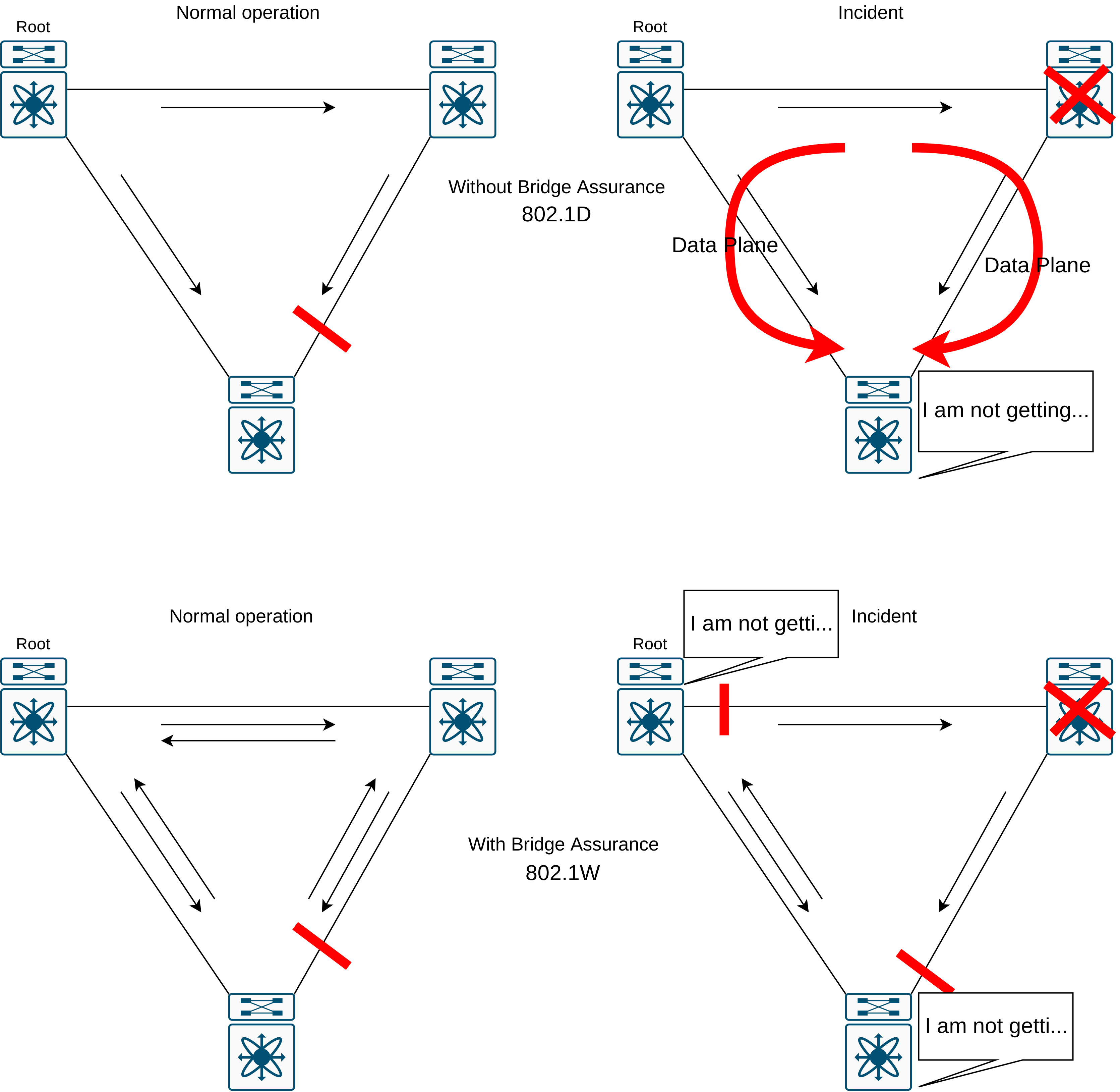
To simulate BPDU Filter, here we simply employ STP BPDU filter feature. Then we will verify that the port goes to BA inconsistency mode
N9K03(config)# configure terminal
N9K03(config)# interface ethernet 1/2
N9K03(config-if)# spanning-tree bpdufilter enable
2022 Apr 24 02:33:23 N9K03 %$ VDC-1 %$ %STP-2-BRIDGE_ASSURANCE_BLOCK: Bridge Assurance blocking port Eth1/2 VLAN: 100.

N9K03(config)# show spanning-tree inconsistentports

Name                 Interface              Inconsistency
-------------------- ---------------------- ------------------
VLAN0100             Eth1/2                 Bridge Assurance Inconsistent

Number of inconsistent ports (segments) in the system : 1
N9K01(config)# 2022 Apr 24 02:35:14 N9K01 %$ VDC-1 %$ %STP-2-BRIDGE_ASSURANCE_BLOCK: Bridge Assurance blocking port Eth1/2 VLAN: 100.

N9K01(config)# show spanning-tree inconsistentports

Name                 Interface              Inconsistency
-------------------- ---------------------- ------------------
VLAN0100             Eth1/2                 Bridge Assurance Inconsistent

Number of inconsistent ports (segments) in the system : 1
Workshop
We will continue from the same topology and configuration in the workshop that we have had if the this post.
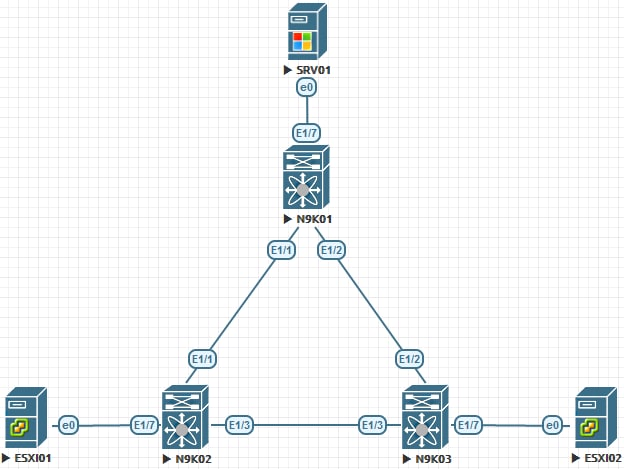
N9K01
  configure terminal
    spanning-tree vlan 1-3967 priority 0
    interface ethernet 1/7
      spanning-tree bpduguard enable
    exit
    interface ethernet 1/1-2
      spanning-tree guard root
    exit
    spanning-tree loopguard default
N9K02
  configure terminal
    spanning-tree vlan 1-3967 priority 4096
    interface ethernet 1/7
      spanning-tree bpdufilter enable
    exit
    spanning-tree loopguard default
N9K03
  configure terminal
    interface ethernet 1/7
      spanning-tree bpdufilter enable
    exit
    spanning-tree loopguard default
N9K02 Verification
N9K02# show spanning-tree interface ethernet 1/3 detail

 Port 3 (Ethernet1/3) of VLAN0100 is designated forwarding
   Port path cost 4, Port priority 128, Port Identifier 128.3
   Designated root has priority 4196, address 5002.0000.1b08
   Designated bridge has priority 4196, address 5002.0000.1b08
   Designated port id is 128.3, designated path cost 0
   Timers: message age 0, forward delay 0, hold 0
   Number of transitions to forwarding state: 1
   The port type is network
   Link type is point-to-point by default
   Loop guard is enabled by default
   BPDU: sent 1862, received 1863