Port-Channel (Ether-Channel)
Link Aggregation
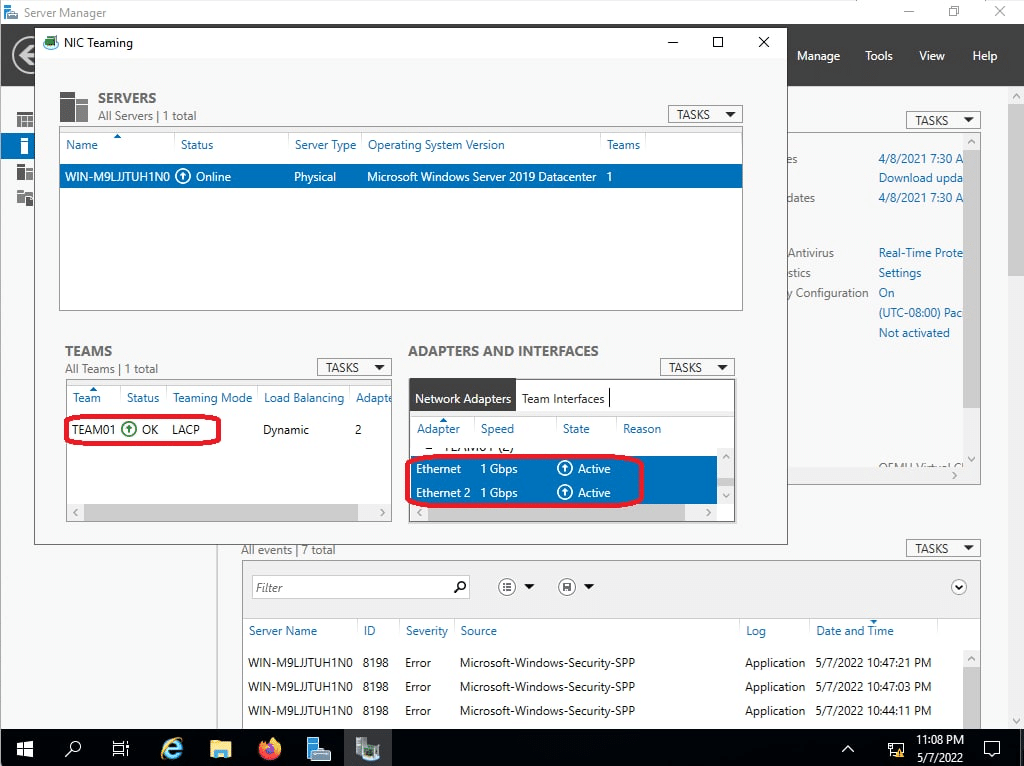
Port-channel is to NX-OS as EtherChannel is to Catalyst. Juniper calls it Aggregated Ethernet interface while Microsoft refers to NIC Teaming . In fact, all refer to the same concept of grouping couple of ports together in to a single logical interface.
Above all, The main advantage of grouping some ports into a single logical interface is that STP does not see the individual interfaces but rather it operates only on that logical link. As a result, we will be having all links in forwarding state. There is two Protocols supported on NX-OS:
- Static LAG: Not recommended.
- Link Aggregation Control Protocol (IEEE 802.3ad): Recommended.
- With its link monitoring LACP provides automatic addition and deletion of the member links without user intervention
Port-Channel: Static LAG
Static LAG is one method of making a link aggregation by forcing member ports to be part of the LAG without any negotiation. This is prune to STP loop if LAG fails.
N9K01# configure terminal
N9K01(config)# feature lacp
N9K01(config)# interface ethernet 1/1-2
N9K01(config-if-range)# channel-group 1 mode on
Port-Channel: Link Aggregation Control Protocol (LACP)
Unlike static LAG configuration, LACP advertises its protocol data units (PDUs) with destination MAC address of 0180:C200:0002. The interface participating in LACP can be configured as:
- Active: Interface will actively send LACP PDUs to the other side to form LAG
- Passive: Interface will passively listens LACP PDUs. However, once it received a LAG message, it becomes the partner peer, and in turn passively transmits the LACP PDUs.
In the table below, I am saying that at least one of the interfaces must be active to form a LAG.
| LACP Mode | Active | Passive |
|---|---|---|
| Active | LACP Forms | LACP Forms |
| Passive | LACP Forms | LACP does not form |
N9K01# configure terminal
N9K01(config)# feature lacp
N9K01(config)# interface ethernet 1/1-2
N9K01(config-if-range)# channel-group 1 force mode active
N9K01(config)# interface ethernet 1/3-4
N9K01(config-if-range)# channel-group 1 force mode passive
LACP Fast-Failover
While the IEEE 802.3ad standard says LACP PDUs are send every 30 seconds but you can override the IEEE 802.3ad standard periodic timer, we can adjust the interval to the value we need.
In case you are in a stable switched network, you’d better not to use LACP fast rate timer as High Availability (HA) and Stateful Switchover (SSO) do not support it. Coupled with that, Cisco also does not recommend lacp fast rate on vPC peer-link.
N9K01# configure terminal

N9K01(config)# feature lacp
N9K01(config)# interface ethernet 1/1-2
N9K01(config-if-range)# channel-group 1 force mode active
N9K01(config-if-range)# lacp rate fast
LACP Combability Parameters
In order for LAG to form the ports must pass the combability requirement. The full list of these requirements are available using show port-channel compatibility-parameters global command. As an example, you cannot LAG a layer 2 interface with a layer 3 interface in the same switch (different port modes). Nevertheless, you can force a port to become LAG member even without meeting all the combability requirements. However, certain requirement such as speed, duplex, and flow control must be met.
N9K01(config)#   show port-channel compatibility-parameters
* port mode
Members must have the same port mode configured, either E,F or AUTO.

* speed
Members must have the same speed configured. If they are configured in AUTO

* MTU
Members have to have the same MTU configured. This only applies to ethernet

* MEDIUM
Members have to have the same medium type configured.

* load interval
Member must have same load interval configured.

* port Voice VLAN
Members must not have voice vlan configured.

* VLAN translation mapping list
Members must have the same VLAN translation list.

* sub interfaces
Members must not have sub-interfaces.

* Duplex Mode
Members must have same Duplex Mode configured.

* Ethernet Layer
Members must have same Ethernet Layer (switchport/no-switchport) configured.

* Span Port
Members cannot be SPAN ports.

* Storm Control
Members must have same storm-control configured.


* Flow Control
Members must have same flowctrl configured.

* Port has PVLAN config
Members must have same pvlan configuration
Distributing Traffic with LACP
Next, I am discussing about the load sharing with LACP. Additionally, NX-OS uses different hashing algorithms to determine how to distribute traffic over LAG members. Distributing method is locally-significant egress implying that the other peer can use a different hashing algorithm.
N9K01# configure terminal
N9K01(config)# feature lacp
! Note that you cannot have different load-balancing methods for different
! Port-channel on one Nexus Switch.
N9K01(config)# port-channel load-balance ?
  dst        Destination based parameters
  internal   Configure port-channel load balance internal commands
  resilient  Configure port-channel load balance resilient mode
  src        Source based parameters
  src-dst    Source-destination based parameters

N9K01(config)# port-channel load-balance src-dst ?
  gtpu                IP and GTP-TEID
  inner-header        Inner header
  ip                  IP
  ip-gre              IP, GRE key
  ip-l4port           IP and L4 port
  ip-l4port-vlan      IP, L4 port and VLAN
  ip-vlan             IP and VLAN
  ipv6-flow-label     IPv6 Flow Label
  l4port              L4 port
  mac                 MAC
  mac-ip-l4port-vlan  MAC, IP, L4 port and VLAN
Let us see how src-dst ip hashing algorithm works. First, we need to discuss what XOR operation is:

Altogether, a LAG with 2 interfaces, the switch performs an XOR operation on the last bit of the IPs. Similarly, a switch with 4 interfaces in the LAG XORs the last 2 bits of source and destination IP addresses.
| IP Address | XOR Result | Distribute Frame Over Link number |
|---|---|---|
| 10.90.1.81 (xxxxxx01) 10.90.1.80 (xxxxxx00) | xxxxxx01 | 1 |
| 10.90.1.83 (xxxxxx11) 10.90.1.80 (xxxxxx00) | xxxxxx11 | 3 |
| 10.90.1.84 (xxxxxx00) 10.90.1.80 (xxxxxx00) | xxxxxx00 | 0 |
L3 Port-Channel
You can also bundle L3 interfaces to together. It does not require the other side also to be L3 as LACP is independent of the port mode. (Do not confuse this with LACP combability parameters wherein the parameters must match locally on the switch for different interfaces).
N9K01# configure terminal
N9K01(config)# feature lacp
N9K01(config)# interface ethernet 1/1-2
N9K01(config-if-range)# no switchport
N9K01(config-if-range)# channel-group 1 mode active
MultiChassis LAG (MCLAG)
Our overall point is to add more redundancy to the network. However, having a single switch is a single point of failure. To remove the single failure on the access side of the network, we connect the server to two different switches (chassis). The following is different technologies used to provide redundancy at the chassis level:
- Cisco StackWise
- Virtual Switching System
- Virtual Port Channel (vPC)
The goal with MCLAG is make the server think that it is multihomed to a single switch. For that to work, switches must synchronize their control plane amongst them while forwarding the traffic in and out the member ports on both chassis.
Port-Channel workshop
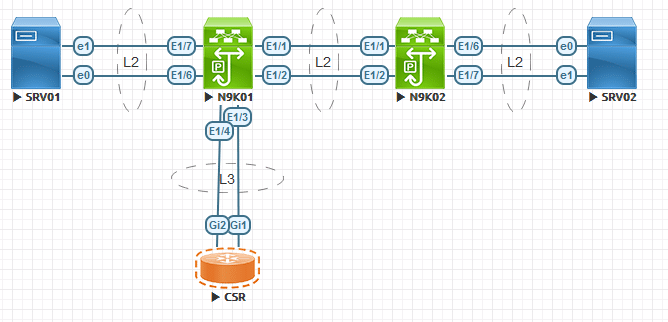
Configuration
N9K01
feature lacp
interface ethernet 1/1-2
channel-group 1 mode active
interface port-channel 1
  switchport mode trunk
  spanning-tree port type network
interface ethernet 1/6-7
channel-group 2 mode active
interface port-channel 2
  switchport mode access
  spanning-tree port type edge
interface ethernet 1/3-4
no switchport
  no shutdown
channel-group 3 mode active
interface port-channel 3
  ip address 192.168.1.0/31
N9K02
feature lacp
interface ethernet 1/1-2
channel-group 1 mode passive
interface port-channel 1
  switchport mode trunk
  spanning-tree port type network
interface ethernet 1/6-7
channel-group 2 mode active
interface port-channel 2
  switchport mode access
  spanning-tree port type edge
CSR01
interface port-channel 3
interface range gigabitEthernet 1-2
 channel-group 1 mode passive
interface port-channel 3
 ip address 192.168.1.1 255.255.255.254
Windows
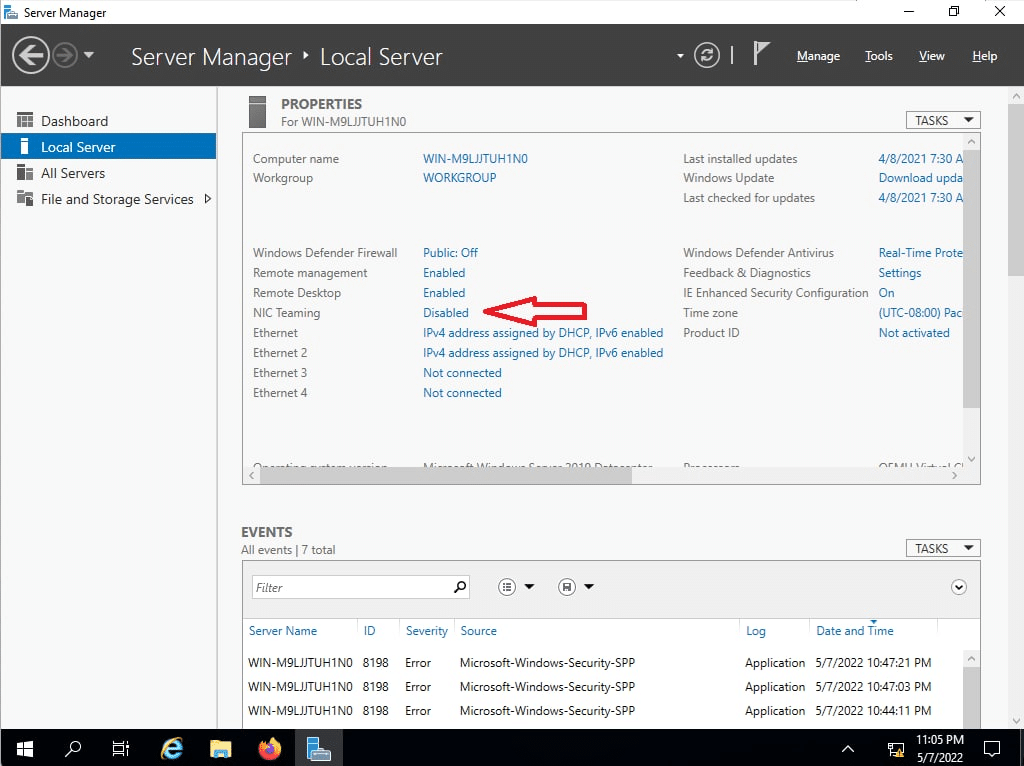
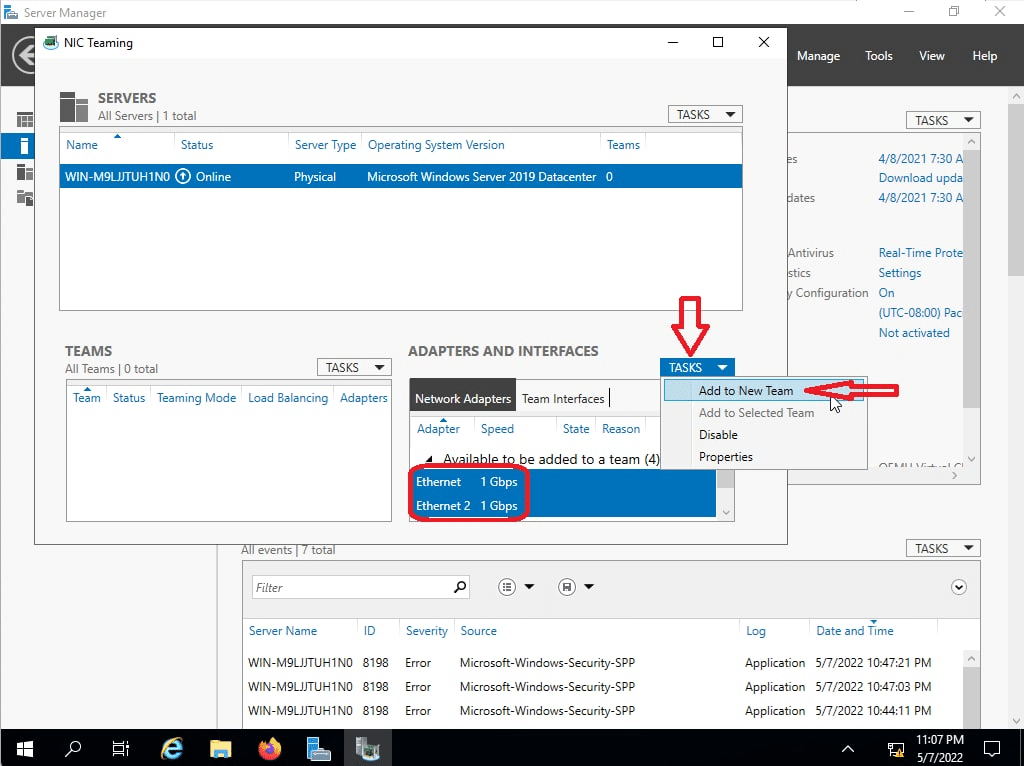
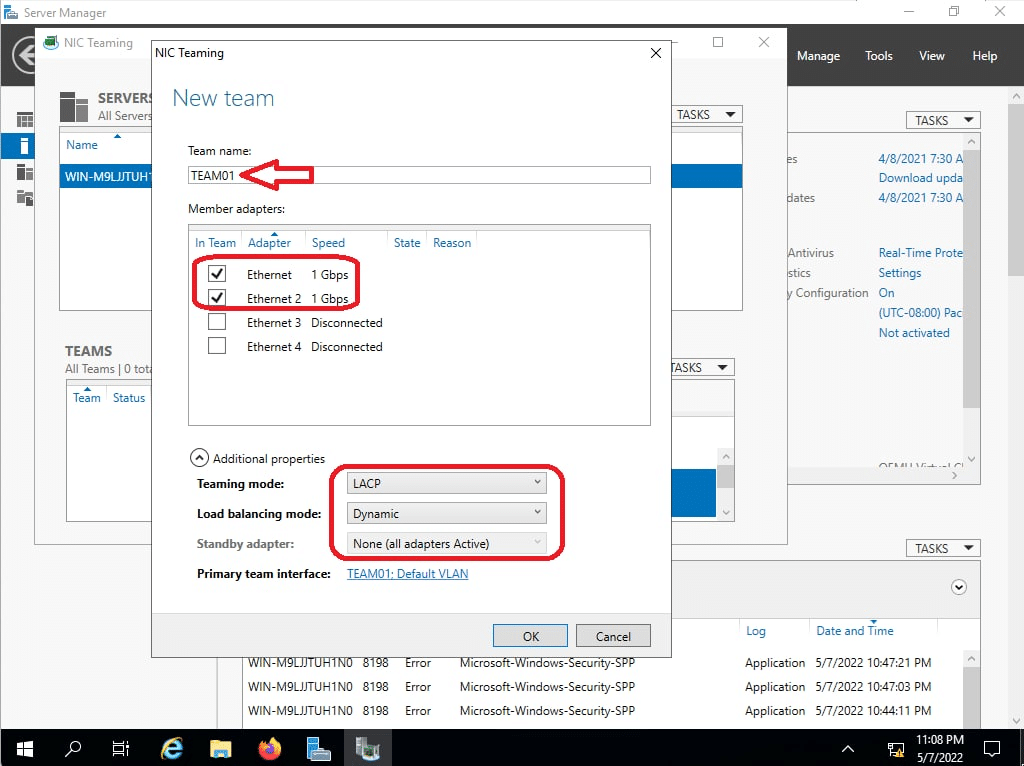
Verification
N9K01(config)# show port-channel summary
Flags:  D - Down        P - Up in port-channel (members)
        I - Individual  H - Hot-standby (LACP only)
        s - Suspended   r - Module-removed
        b - BFD Session Wait
        S - Switched    R - Routed
        U - Up (port-channel)
        p - Up in delay-lacp mode (member)
        M - Not in use. Min-links not met
--------------------------------------------------------------------------------
Group Port-       Type     Protocol  Member Ports
      Channel
--------------------------------------------------------------------------------
1     Po1(SU)     Eth      LACP      Eth1/1(P)    Eth1/2(P)
2     Po2(SU)     Eth      LACP      Eth1/6(P)    Eth1/7(P)
3     Po3(RU)     Eth      LACP      Eth1/3(P)    Eth1/4(P)

N9K01(config)# show lacp counters
NOTE: Clear lacp counters to get accurate statistics

------------------------------------------------------------------------------
                           LACPDUs                      Markers/Resp LACPDUs
Port              Sent              Recv                  Recv Sent  Pkts Err
------------------------------------------------------------------------------
port-channel1
Ethernet1/1        318                287                    0      0    0

Ethernet1/2        318                288                    0      0    0


port-channel2
Ethernet1/6        7876               267                    0      0    0

Ethernet1/7        7877               269                    0      0    0


port-channel3
Ethernet1/3        92                 39                     0      0    0

Ethernet1/4        90                 38                     0      0    0